




You may need to update pip in existing virtual environments even after installing a new Python release. A project can keep its own package installer and certificate bundle. Therefore, the version you checked in one terminal is only one entry in the inventory.
Checked October 25, 2026. Python’s October 20 certificate-incident notice and October 21 interpreter releases make this a timely maintenance task. This report separates six published tool thresholds, three interpreter releases and an original environment worksheet. It does not report a survey of affected users or a completed security audit.
For US students, instructors and junior developers, the useful question is practical: which project environments still need evidence? Start with a list of the projects and services you control. Then check each relevant tool in the environment that actually runs that work.
Why update pip in existing virtual environments?
The October 21 Python release announcement identifies three expedited or special security releases: 3.15.1, 3.14.9 and 3.13.17. Each bundles pip 26.2.2 with certifi 2026.10.19. The announcement also directs users to update pip and uv in existing environments. Installing an interpreter is not evidence that every old environment received that update.
| Python release | Bundled pip | certifi in bundled pip |
|---|---|---|
| 3.15.1 | 26.2.2 | 2026.10.19 |
| 3.14.9 | 26.2.2 | 2026.10.19 |
| 3.13.17 | 26.2.2 | 2026.10.19 |
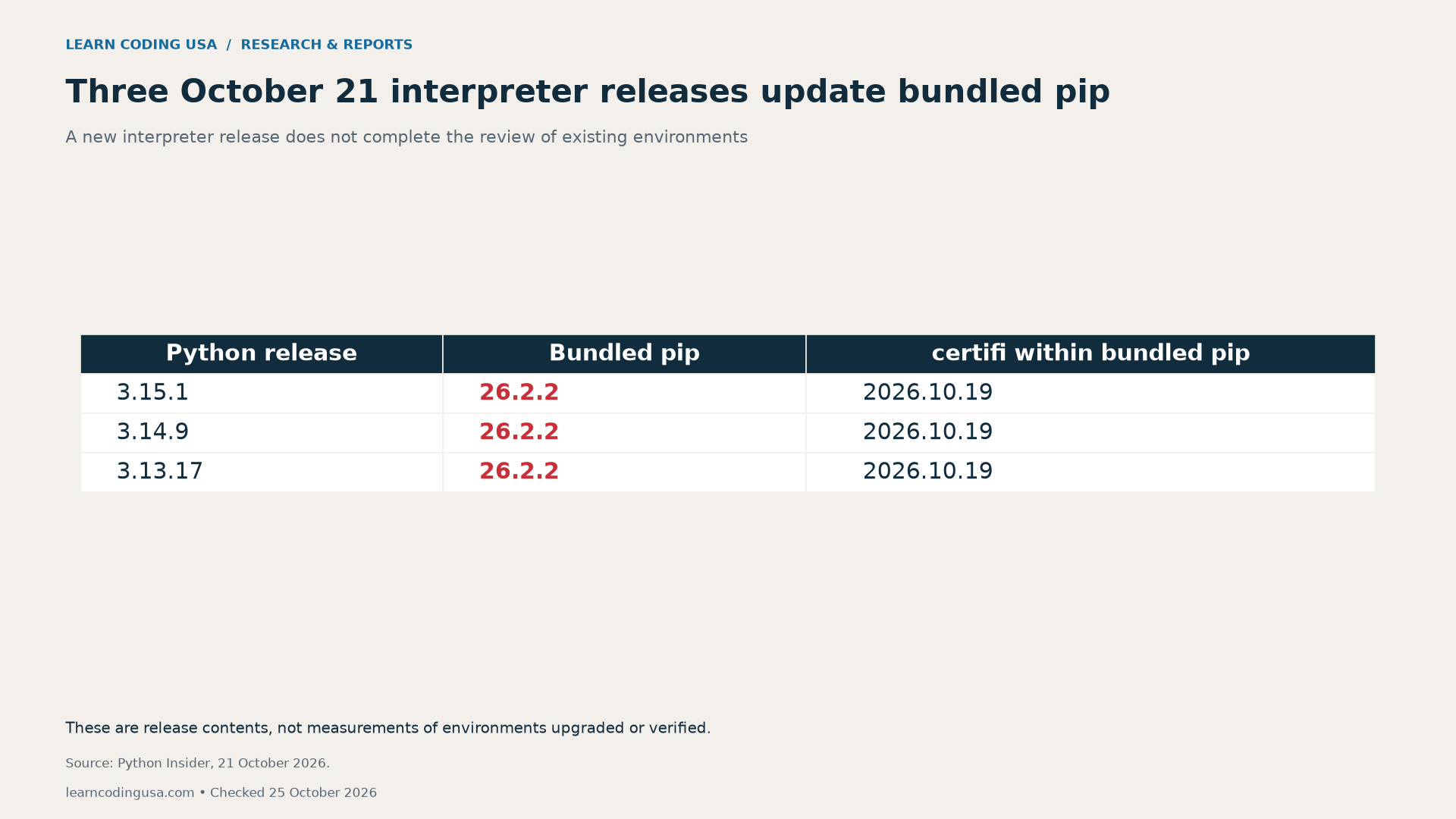
Python 3.13 had just entered security-only mode. Its installer-bearing release was an exception explained by the release team. That context matters when teaching release lifecycles: the presence of an installer does not mean that every branch has the same maintenance status.
A virtual environment provides isolation for project packages. In the official venv documentation, environments are disposable and intended to be recreated. They are not portable project artifacts to commit to Git. Keep the project’s dependency specification and reproducible setup instructions instead.
Six tool thresholds: check what you actually use
The Python.org incident notice lists the minimum versions below. These are incident-specific reference points, not a claim that they remain the latest releases. Check current official instructions before remediation. You do not need to install all six tools merely to complete an inventory.
| Tool, if used | Minimum in the October 20 notice |
|---|---|
| certifi | 2026.10.19 |
| pip | 26.2.2 |
| uv | 0.13.4 |
| sigstore | 4.5.1 |
| conda | 26.9.4 |
| pixi | 0.82.1 |
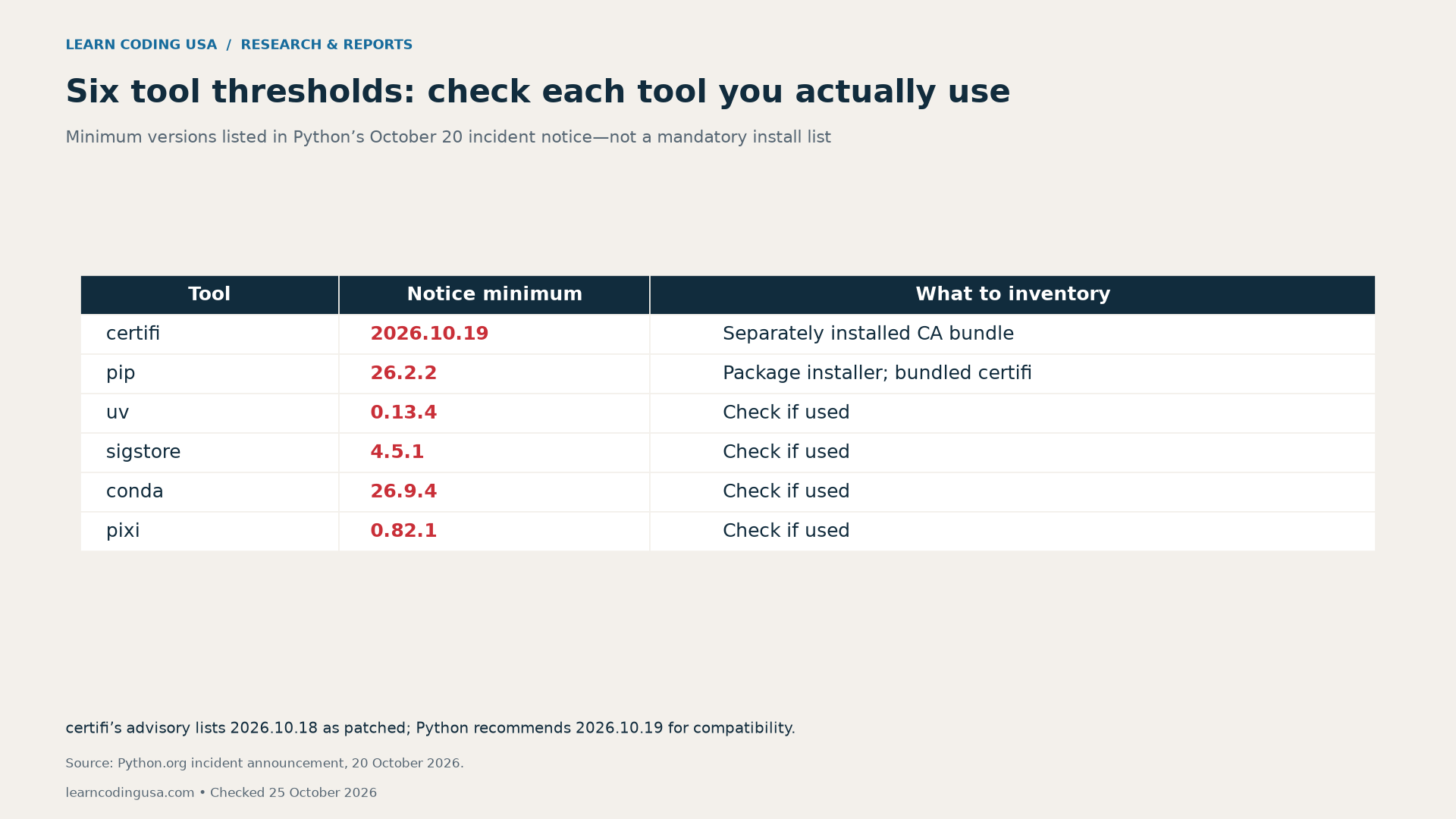
The certifi advisory names 2026.10.18 as patched. Python recommends 2026.10.19 for compatibility with unaffected emSign roots. Those dates describe different details; they should not be collapsed into a contradictory “fixed version” claim. Record both the advisory and the guidance used for your decision.
For optional tools, write “not used” only after checking the project’s setup. A command missing from the current shell does not necessarily establish that a build agent or container never uses it. Keep those execution contexts separate rather than guessing from your laptop.
Separate system certificates from pip and project certifi
The pip certificate documentation explains that its default system-store support uses system certificates in addition to certifi. Updating an operating system’s trust store therefore does not, by itself, demonstrate what a separately bundled copy trusts. The incident discussion explicitly warns about older pip retaining its bundled trust.
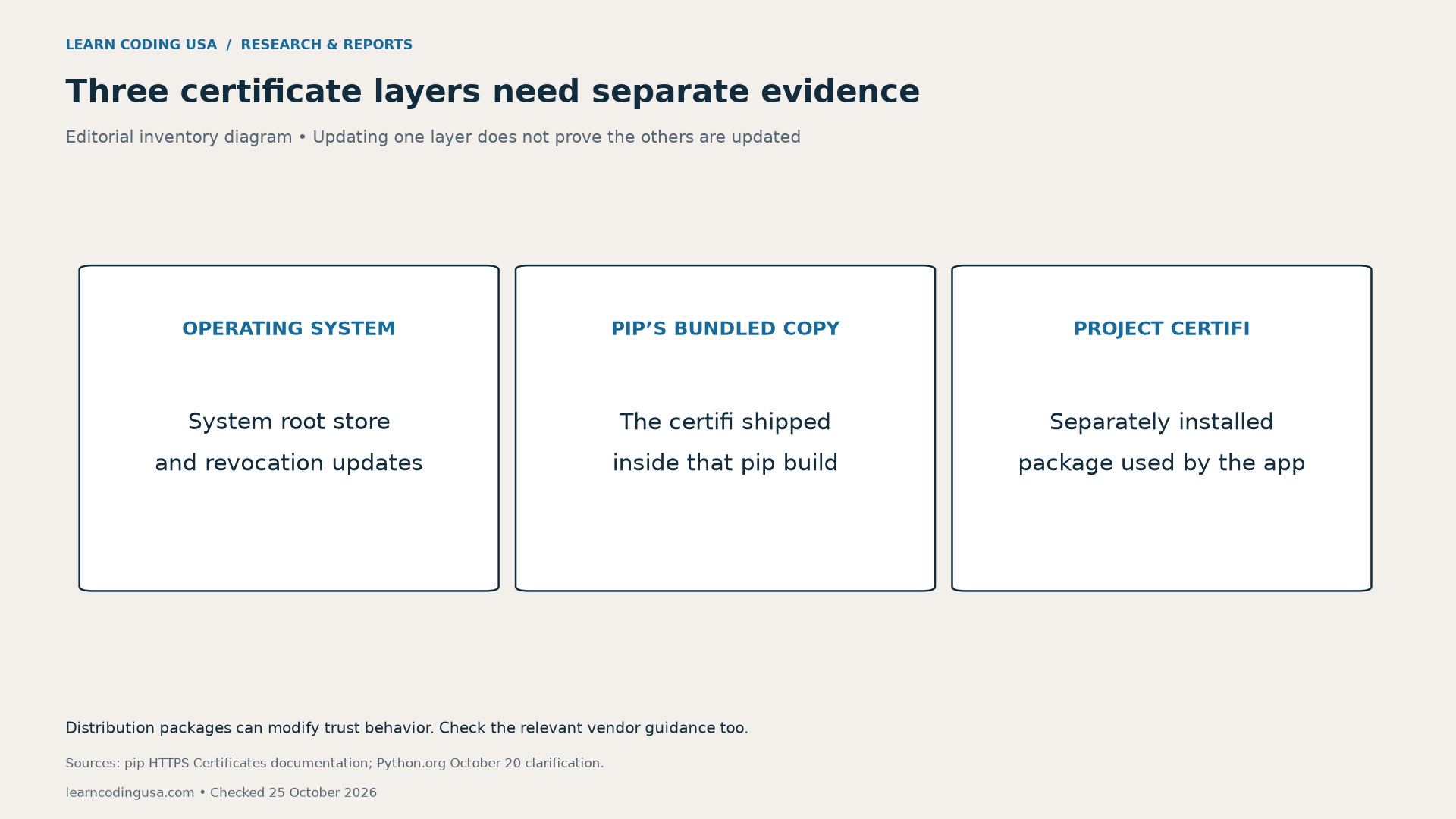
Also distinguish the certifi installed as an application dependency from the copy included inside pip. A package-list result for one is not proof of the other’s version. Record the pip build separately, then record the application package when the project uses it.
Do not disable TLS verification to make an update succeed. If a corporate proxy, managed computer or private package index affects the connection, use your organization’s documented process. Ask the responsible administrator to resolve certificate issues. A successful download obtained by removing verification would not establish the assurance this exercise seeks.
Inventory each environment before changing it
Use one worksheet row per project environment or running service. Record a stable project name, the environment location and the interpreter path. Then record the interpreter version, pip version and pip installation path. This prevents a result from one project being attached to another by accident.
For a trusted project you control, these local diagnostic commands can help identify the selected interpreter and installer. They inspect the currently selected environment; they do not update packages, validate certificate contents or prove that another service uses the same executable.
python -c "import sys; print(sys.executable); print(sys.version)"
python -m pip --version
Before using a terminal result, confirm which interpreter the shell resolves. Your editor’s notebook kernel, a scheduled job and a deployed service can use different paths. Ask the owner of each context for its own evidence. Avoid importing or executing untrusted project code merely to fill in a worksheet.
Tech Consulting Tailored to Your Coding Journey
Get expert guidance in coding with a personalized consultation. Receive unique, actionable insights delivered in 1-3 business days.
Get Started
The blank environment inventory (CSV) includes fields for both certificate-package layers, optional tools, container rebuilding, an owner and open questions. Keep credentials, access tokens and private configuration values out of a shared copy. It is a record template, not an automated scanner.
How to update pip in existing virtual environments and verify it
First, preserve the project’s dependency specification and a recovery route appropriate to its importance. Next, follow the current official update instructions for the relevant interpreter and package manager. The Python incident notice provides a hash-pinned pip bootstrap procedure; use that maintained source for the incident-specific command.
After remediation, inspect the same environment again. Record the observed version and path rather than copying an intended target from a task list. If a managed vendor supplies a modified package, keep the matching vendor notice and build evidence with the row.
Containers need their own entry. The incident notice calls for rebuilding images with layer caching disabled to fetch updated system certificates. Verify the resulting image and the deployed service. Updating the host computer does not establish that an older image contains the same files.
Finally, run the project’s normal functional checks and record the actual result. A passing test supports behavior under that test. It does not prove that every dependency or certificate path has been reviewed. Keep failed and unrun checks visible with an owner and next action.
Measure coverage without hiding unknown environments
Suppose an instructor discovers six environments and verifies four, leaving two unresolved. The coverage calculation is four divided by six: 66.7%. Excluding the unresolved pair would produce four divided by four, or 100%, while hiding unfinished work. This is a hypothetical teaching example, not a finding about Python users.
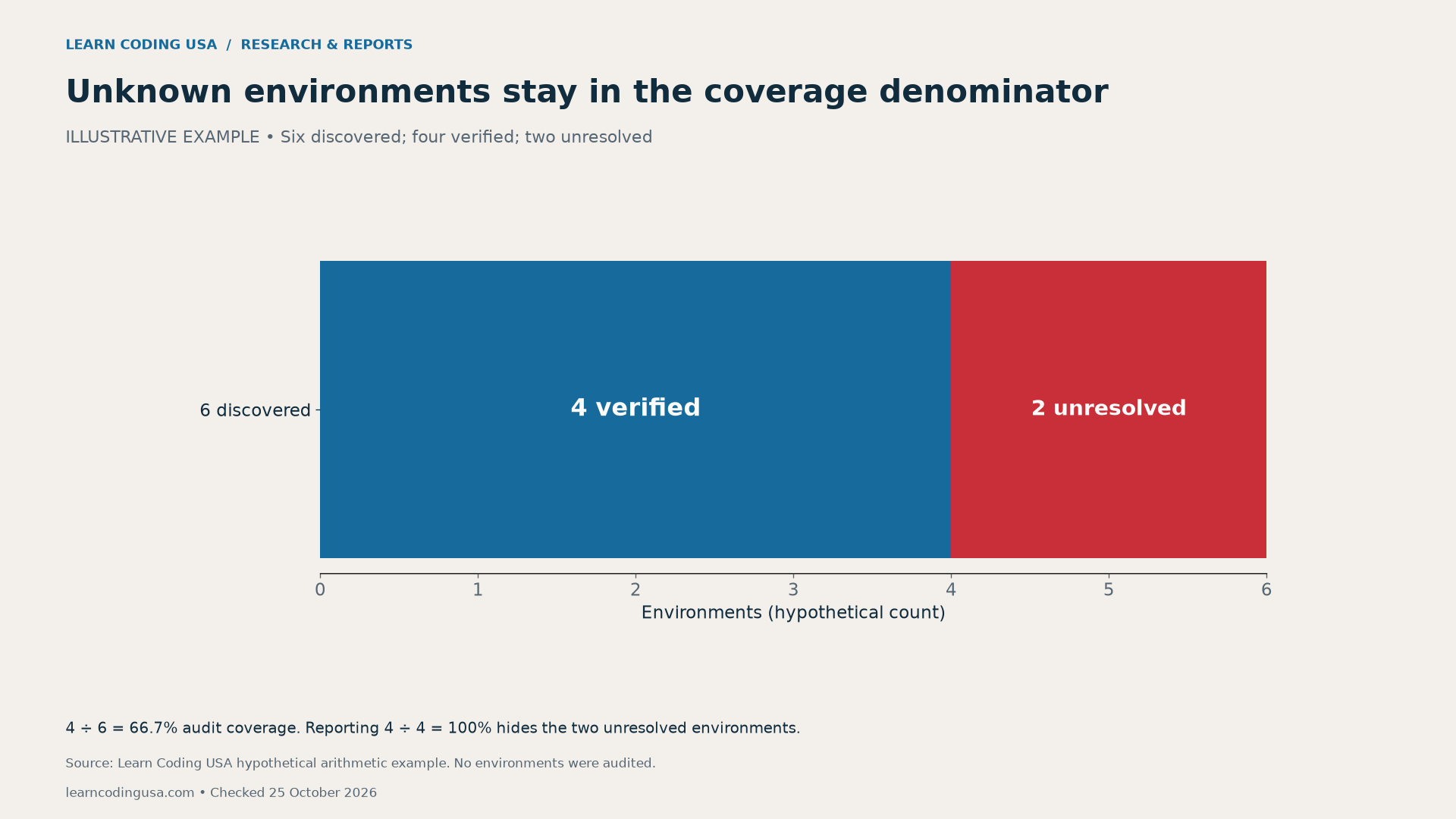
Define “verified” before counting. For this worksheet, it should mean that the applicable version and deployment evidence is recorded and checked. Keep a separate field for functional-test results. A row that only says “updated” is not yet an evidence-based completion record.
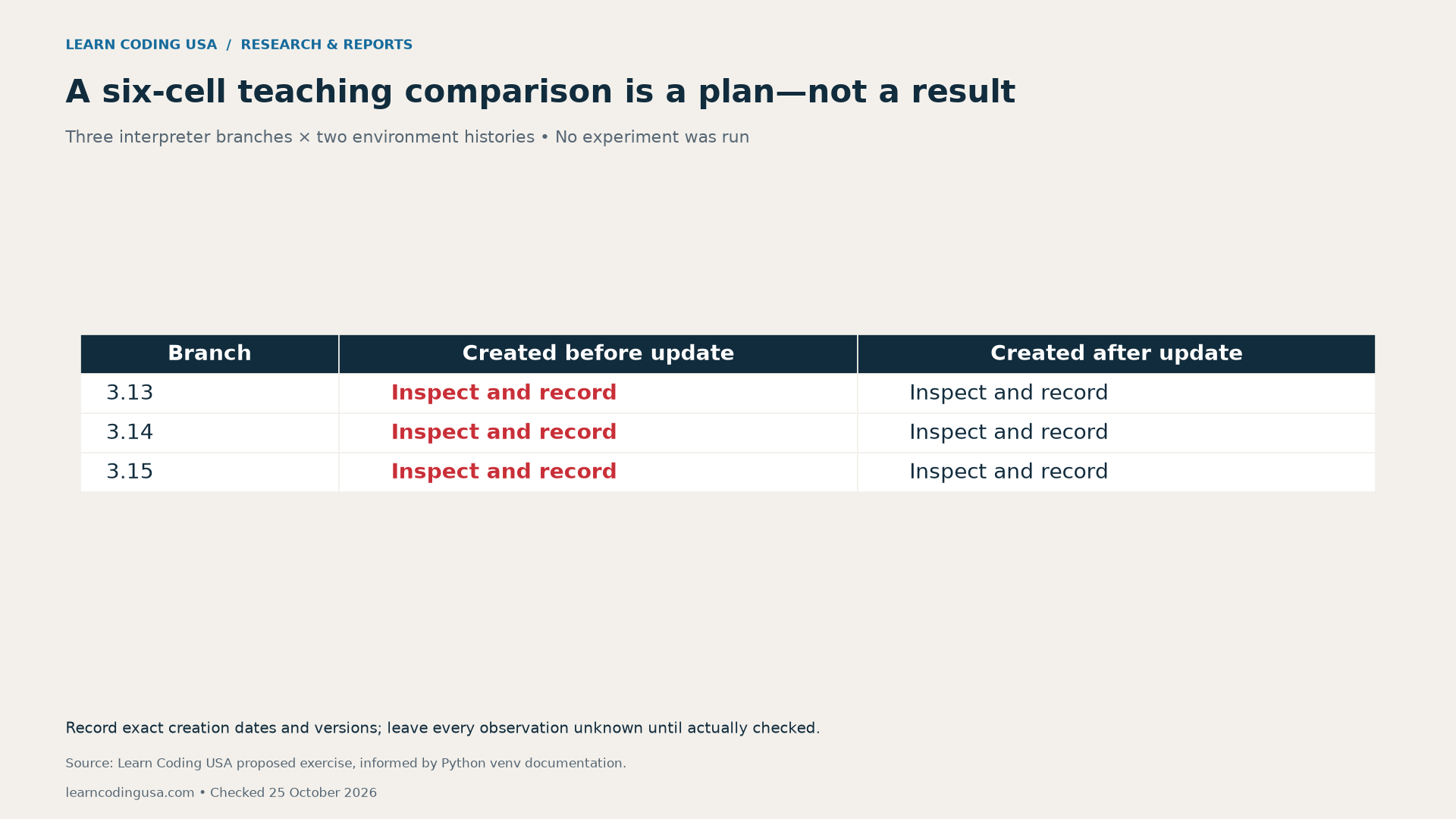
For a class exercise, three interpreter branches multiplied by two environment histories creates six planned comparison cells. An environment created before the update and one created after it may deserve separate inspection. Record creation dates and exact versions; do not infer outcomes from the labels.
Downloads, sources and limits
Use the tool-threshold reference (CSV) alongside the inventory template linked above. It contains six rows transcribed from the October 20 notice. Our reusable worksheet and coverage example are editorial tools. Neither establishes the prevalence of vulnerable environments, compromised users or successful updates.
For broader project practice, see our software security practices guide. Our PHP runtime-verification report applies the same evidence principle to another runtime: identify the process that actually serves the work. Use the official Python documentation for Python-specific technical instructions.
Release and incident guidance can change. Recheck the linked official notices before acting, especially for vendor packages or older interpreters. No vulnerable fixture was installed, no traffic was intercepted and no reader’s environment was changed to produce this article.
Suggested citation: Learn Coding USA, “Updated Python? Check Your Old Virtual Environments, pip and Certificates,” checked October 25, 2026. Cite the official releases for version facts and this report for the inventory template and illustrative coverage calculation.