







This Git security update checklist starts with a question: which copy of Git does each development tool actually use? Updating the executable in one terminal does not establish that a desktop client, remote workspace or container uses that same installation.
The practical task is to identify each installation, match its package evidence and verify it again after updating. Our free ledger keeps confirmed fixes, confirmed affected builds and unresolved cases separate. A worked eight-context fixture shows why counting terminal windows can produce the wrong denominator.
What changed on 10 November 2026
GitHub’s 10 November release announcement describes six Git vulnerabilities and seven patched release lines. It recommends updating Git and applications that bundle it. The release facts do not measure infections, affected US developers or the number of copies on your computer.
| Maintenance line | Patched release listed |
|---|---|
| 2.56 | 2.56.1 |
| 2.55 | 2.55.1 |
| 2.54 | 2.54.1 |
| 2.53 | 2.53.1 |
| 2.52 | 2.52.1 |
| 2.51 | 2.51.3 |
| 2.50 | 2.50.2 |
For a Windows installation, the official Git install page lists 2.56.1 as the latest release when checked. Other operating systems, applications and managed images have their own distributors. Record the package build and its notice, rather than replacing vendor-managed files by hand.
A source conflict worth retaining in your ledger
The linked recursive-clone advisory currently labels affected versions “all” and patched versions “none.” Its description still discusses patches under consideration. That metadata conflicts with the release announcement’s fixed-version list. We preserve both observations rather than silently treating the metadata as an up-to-date version rule.
| Evidence checked | What it says | How this checklist uses it |
|---|---|---|
| 10 November release announcement | Lists seven patched releases | Records announced release targets |
| Linked recursive-clone advisory metadata | Affected: all; patched: none | Flags the conflict for review |
| Your distributor or application notice | Depends on your exact package/build | Needed to confirm the installed package status |
This conflict also limits automation. A script that reads one field could produce a misleading answer. Our worksheet therefore requires an evidence note and an unresolved-status option. If your vendor has backported a fix, an older-looking version alone does not prove that its package remains affected.
Use the Git security update checklist across environments
Start with the environments you own or are authorised to inspect: your normal terminal, each IDE workspace, desktop clients, local development images and any CI image you maintain. Include a remote or WSL workspace as a separate environment. Do not access a shared runner or another person’s machine merely to complete the sheet.
In a terminal, git --version reports the Git suite version. The official command reference documents that option. It does not inventory other applications, containers or remote hosts. Keep the command’s environment and executable identity beside its output, so a later check can be compared with the same installation.
# Read-only check in the current shell
git --version

# In a POSIX shell: identify the command resolved in this environment
command -v git

# In PowerShell: list matching command resolutions
Get-Command git -All | Select-Object CommandType, Name, Source
PowerShell’s Get-Command documentation distinguishes command types and supports -All. Review whether a result is an application, alias or function. A shell-resolution list still does not discover every bundled executable outside that environment. Treat it as one source of inventory evidence.
Check the IDE’s actual Git environment
VS Code’s source-control troubleshooting guide explains that its Git Output window records the executable and version. Open Git: Show Git Output from the Command Palette. For a remote workspace, inspect the remote environment as well as the local computer.
Keep the relevant executable and version evidence, without publishing a complete trace log. Such logs can contain repository paths, remote URLs and other development details. Redact private information before sharing a teaching example. There is no need to collect passwords, tokens, private repository URLs or repository contents for this inventory.
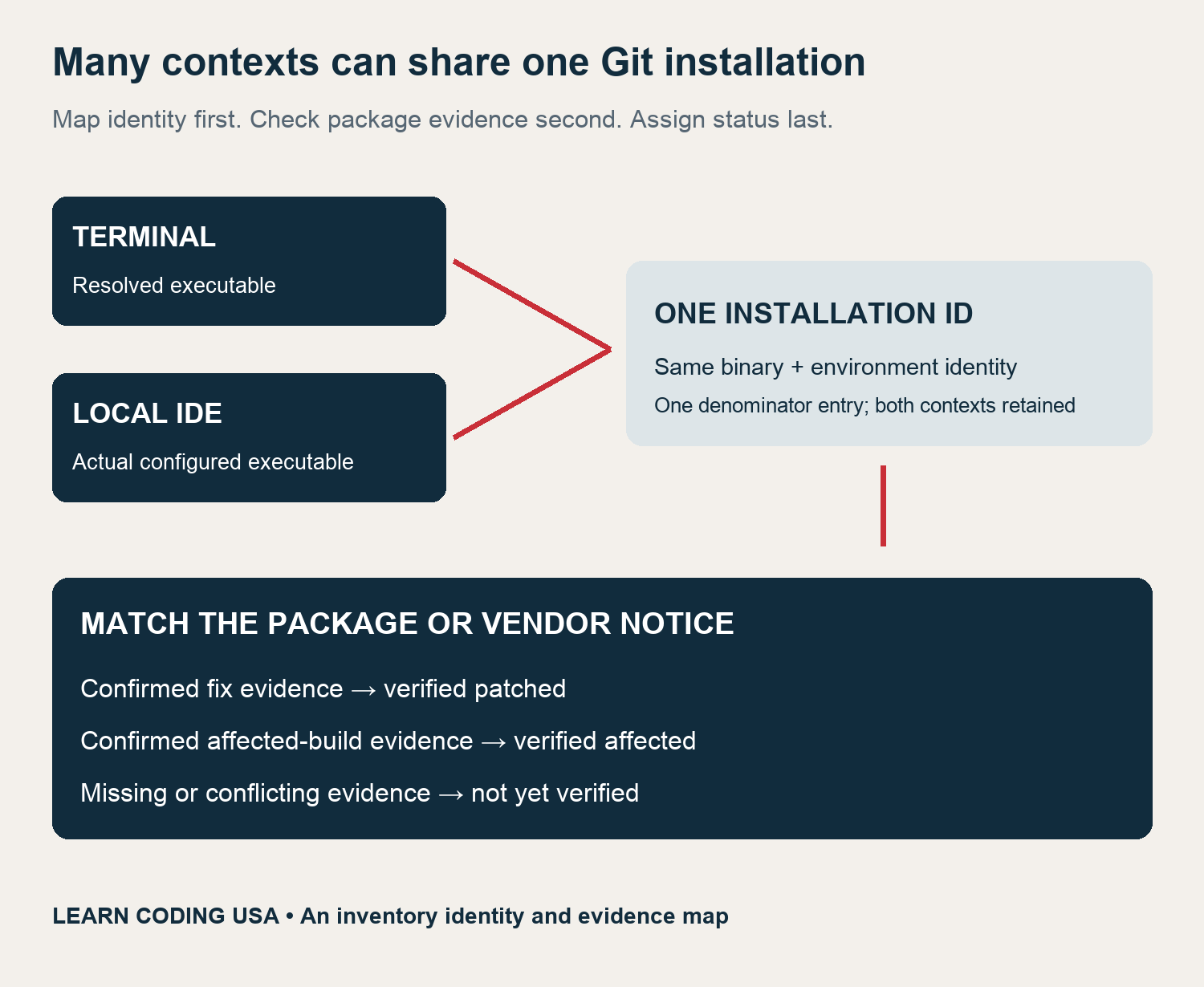
Do not assume every IDE bundles Git, and do not assume every IDE uses your normal terminal’s copy. Compare the actual paths and environment. When two contexts point to the same binary in the same environment, retain both context rows but give the underlying installation one ID.
Separate update ownership from version discovery
A package-managed terminal installation, an application’s bundled tool and a container image may have different update owners. Record who can update each one. For a managed application, use its official update mechanism. For an image you maintain, record the replacement build or digest and check the Git version inside that replacement.
An image tag can move. A recorded digest or another stable build reference makes a later check easier to reproduce. Do not assume updating the host changes an existing image. Likewise, an automatic application-update setting is a plan, not proof that the running application now uses the expected build.
Calculate coverage without counting the same binary twice
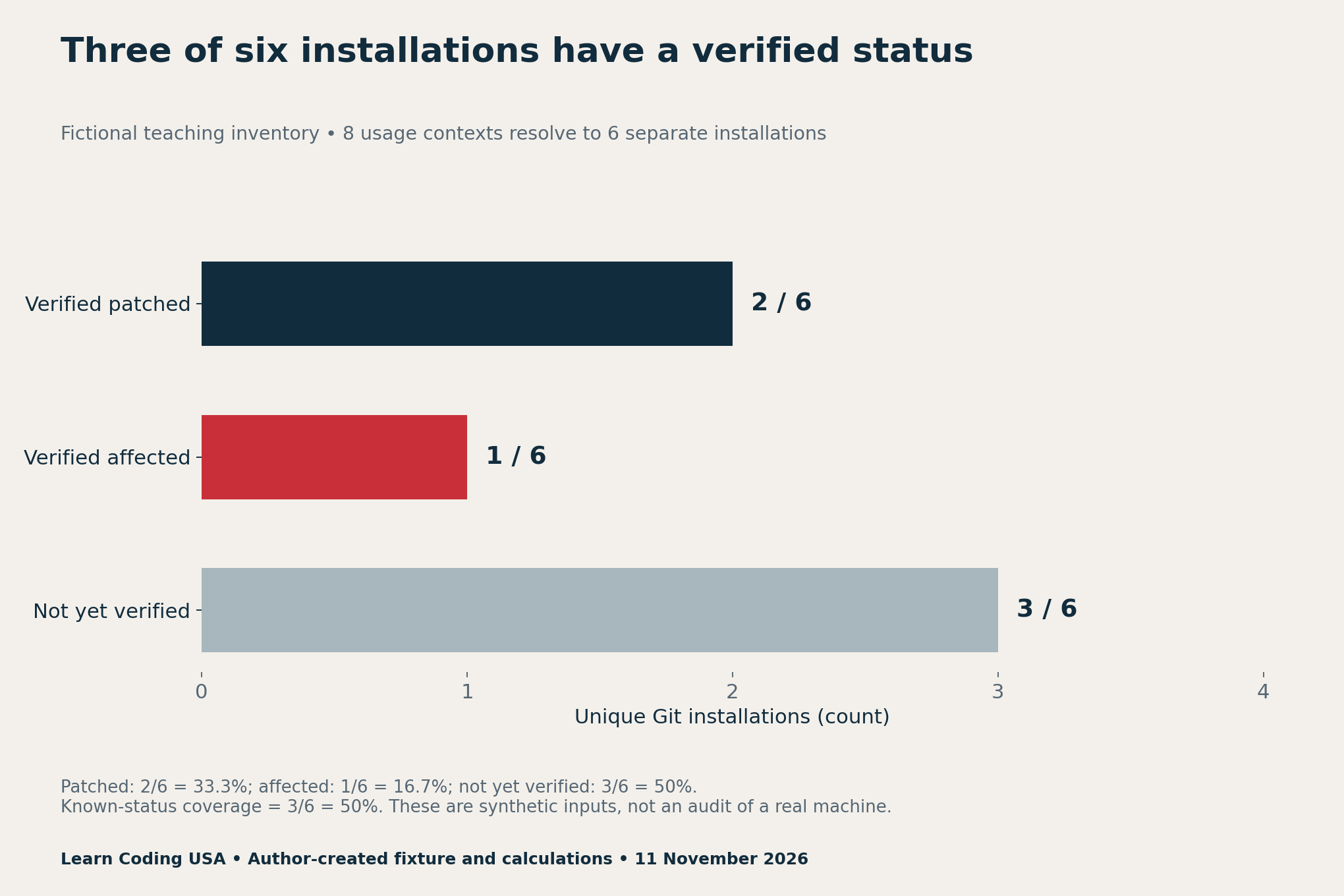
Our fictional fixture has eight usage contexts but six unique installations. The terminal and local IDE share installation A. The desktop client and second IDE share installation B. Those duplicate contexts must not add two extra installations to the denominator.
Tech Consulting Tailored to Your Coding Journey
Get expert guidance in coding with a personalized consultation. Receive unique, actionable insights delivered in 1-3 business days.
Get StartedWe executed the fixture’s grouping calculation locally. It produces two verified-patched installations, one verified-affected installation and three not yet verified. The classifications are chosen teaching inputs supported by fictional evidence notes. They are not observations from a real development machine or estimates of vulnerability prevalence.
| Measure | Calculation | Meaning in this fictional fixture |
|---|---|---|
| Verified-patched coverage | 2 ÷ 6 = 33.3% | Evidence of a fix for two unique installations |
| Known-status coverage | (2 + 1) ÷ 6 = 50% | A confirmed patched or affected status for three |
| Unresolved share | 3 ÷ 6 = 50% | Three need more evidence |
Counting context rows instead would give three patched rows out of eight, or 37.5%. That answers a different question about contexts. It must not be labelled a percentage of unique installations. Even a correctly calculated 100% figure remains conditional on how complete your discovery process was.
Recheck after updating, then retain the evidence
After the responsible owner updates a package, reopen the relevant application or environment and repeat the same checks. Record the new build, checked date and supporting notice. A successful installer message and a version command from a different shell do not prove that the original context changed.
If the version, vendor notice or executable identity is still unclear, keep the row unresolved and assign an owner. Avoid testing the vulnerability with an untrusted repository. This checklist needs no exploit, recursive clone, merge or patch execution. A completed inventory also cannot prove that a device was never compromised.
Download the inventory and calculation files
- Seven announced patched release lines (CSV)
- Blank context and installation ledger (CSV)
- Eight-context synthetic worked example (CSV)
- Reconciled coverage calculations (CSV)
Keep your real paths and private build notes locally. The blank ledger separates context, installation ID, executable reference, reported version, distributor, evidence, update owner and remaining uncertainty. A missing field is an unanswered question, not an automatic pass.
For a related account-maintenance task, use our GitHub personal access token audit. It covers a different control: updating a local Git executable does not review token permissions or remove an unused credential.
Method, limitations and reuse
Research checked 11 November 2026. We retained the announcement, linked advisory metadata and official Git, Windows, PowerShell and VS Code documentation. The seven-release ledger transcribes the announcement’s version strings. The eight-context fixture and grouping calculations are original synthetic teaching material, not a machine scan.
Only one statistical chart is used because the question supports one useful inventory calculation. Versions remain in a readable table, and the identity map explains the process without inventing a numeric scale. No infection rate, complete affected-version range or independent security certification is claimed.
Suggested citation: Learn Coding USA, “Git Security Update Checklist: Find Every Git Copy,” 11 November 2026. Credit the linked maintainers for release facts and this report for the inventory framework and worked fixture. Send evidence-backed corrections through our contact page.


