




The Node.js 26 LTS support timeline offers a longer official runway than the two older supported lines. Yet a runtime date cannot tell you whether your whole project will remain maintainable. Your host, framework or operating system may impose an earlier limit.
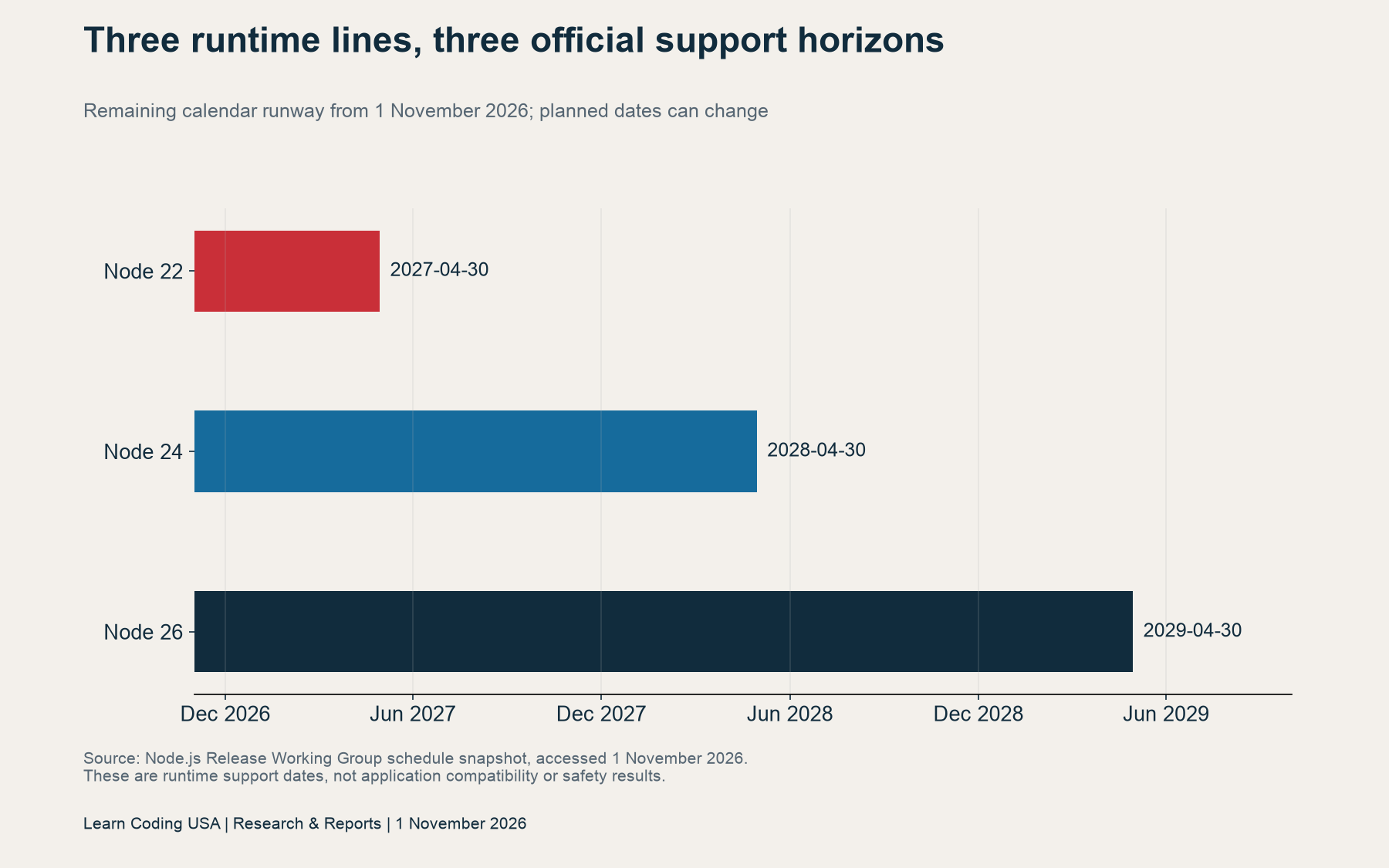
As of 1 November 2026, our calendar calculation gives Node 22, 24 and 26 another 180, 546 and 911 days, respectively, until their scheduled support ends. This report supplies the inputs, a fictional project comparison and a blank compatibility register. We performed date arithmetic, not installation or migration tests.
What changed with Node.js 26 LTS?
The official 28 October release announcement marks version 26.13.0 as the start of the 26.x LTS phase. It describes a metadata change from 26.12.1, rather than new functionality. It also flags the Linux libatomic dependency for users moving from older LTS lines.
Therefore, keep two decisions separate. First, choose a supported runtime line that fits the intended project life. Then verify the exact release, dependencies and deployment environment. An LTS label does not replace application checks. Equally, choosing a longer support horizon does not establish that a migration will succeed.
For a student capstone, write down who maintains the project after the demonstration. For a portfolio service, decide whether the public demo will stay online. A clear retirement date makes the support question answerable. Without it, “enough runway” has no defined meaning.
Read the Node.js 26 LTS support timeline
The Release Working Group schedule lists support ends of 30 April 2027 for Node 22, 30 April 2028 for Node 24 and 30 April 2029 for Node 26. These are planned dates and may change. We retained the retrieved JSON snapshot and its SHA-256 fingerprint.
| Runtime line | Scheduled support end | Days from 1 Nov 2026 |
|---|---|---|
| Node 22 | 30 Apr 2027 | 180 |
| Node 24 | 30 Apr 2028 | 546 |
| Node 26 | 30 Apr 2029 | 911 |
Think of these horizons as roughly 6, 18 and 30 months. However, use actual dates for a handover plan. A month does not always contain 30 days. The interval from April 2027 to April 2028 includes a leap day, which explains why adjacent horizons do not differ by the same number of days.
Build a calendar for the whole stack
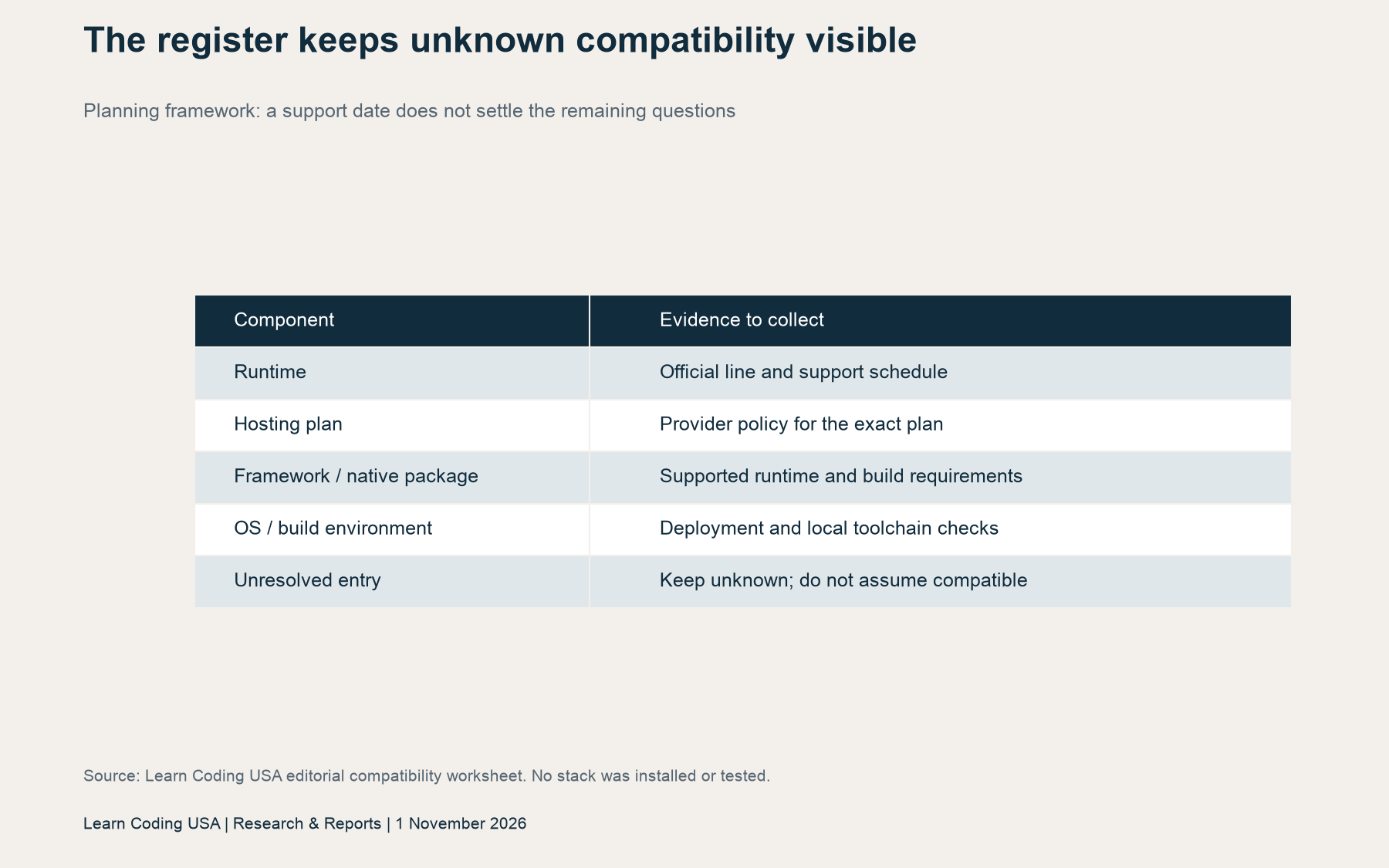
Start with the application’s intended retirement date. Next, list each component that can constrain support. Include the hosting plan, framework, native packages, operating system and build environment. Record a dated source for every support claim. Keep a separate field for actual compatibility evidence.
A provider’s general marketing page may not cover your exact plan or deployment region. Similarly, a framework’s accepted runtime range does not prove that your native dependency builds correctly. Check the documentation that applies to the version and environment you will use. Leave an unresolved entry visible.
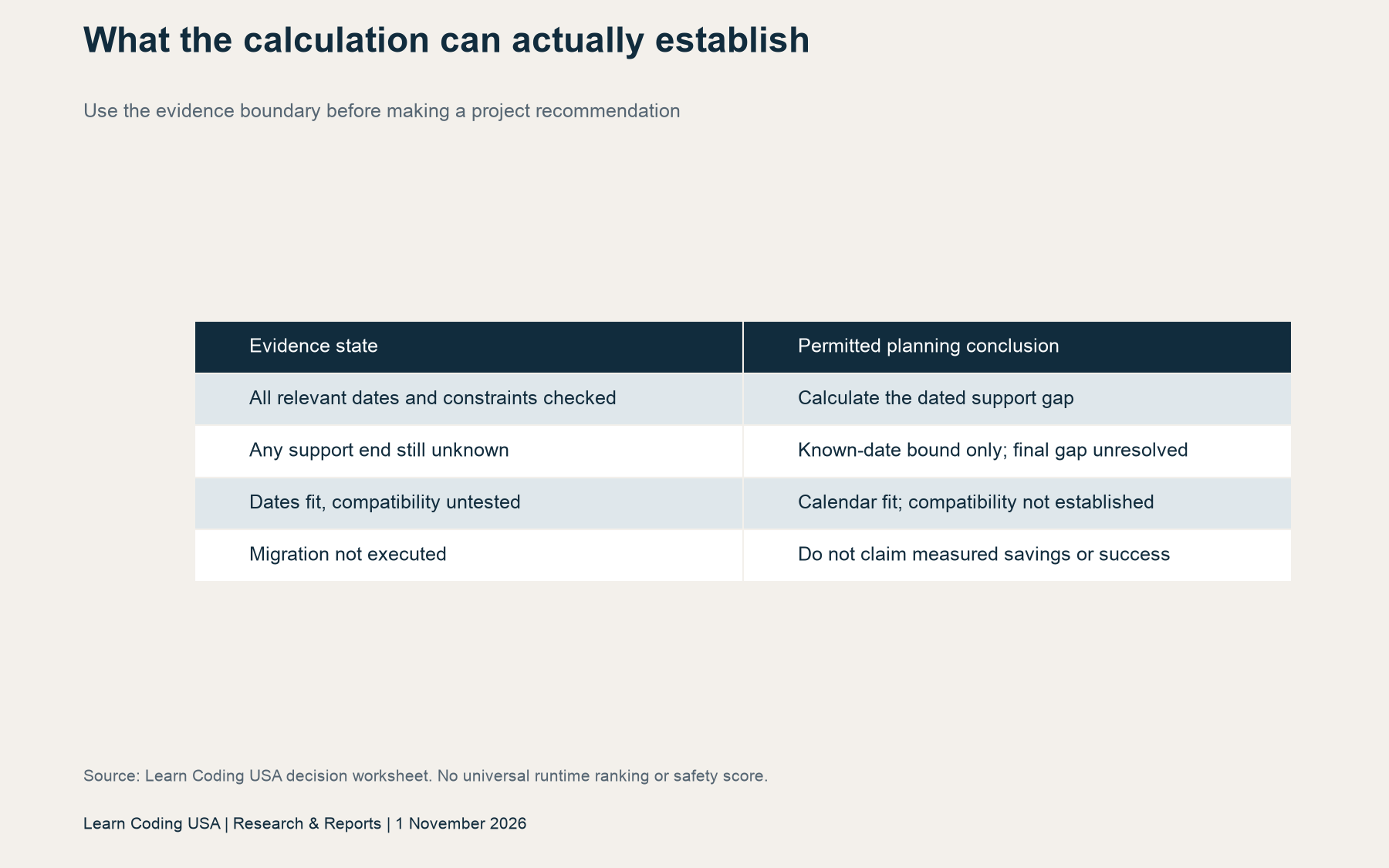
The earliest verified support end provides a useful planning constraint. Yet it is incomplete when another required component has an unknown end date. In that case, report a bound based on known dates and mark the final stack gap unresolved. Never turn an empty worksheet cell into assumed compatibility.

A fictional project shows the hosting constraint
Consider an explicitly fictional teaching project that retires on 31 December 2028. Assume its host ends support on 30 June 2028 and its framework ends support on 31 December 2029. For this example only, assume all other constraints and compatibility questions have been checked.
We calculate the known support gap as the positive difference between retirement and the earliest stated support end. The result is 611 days for the Node 22 stack, 245 days for the Node 24 stack and 184 days for the Node 26 stack. These are scenario results, not observed deployment outcomes.
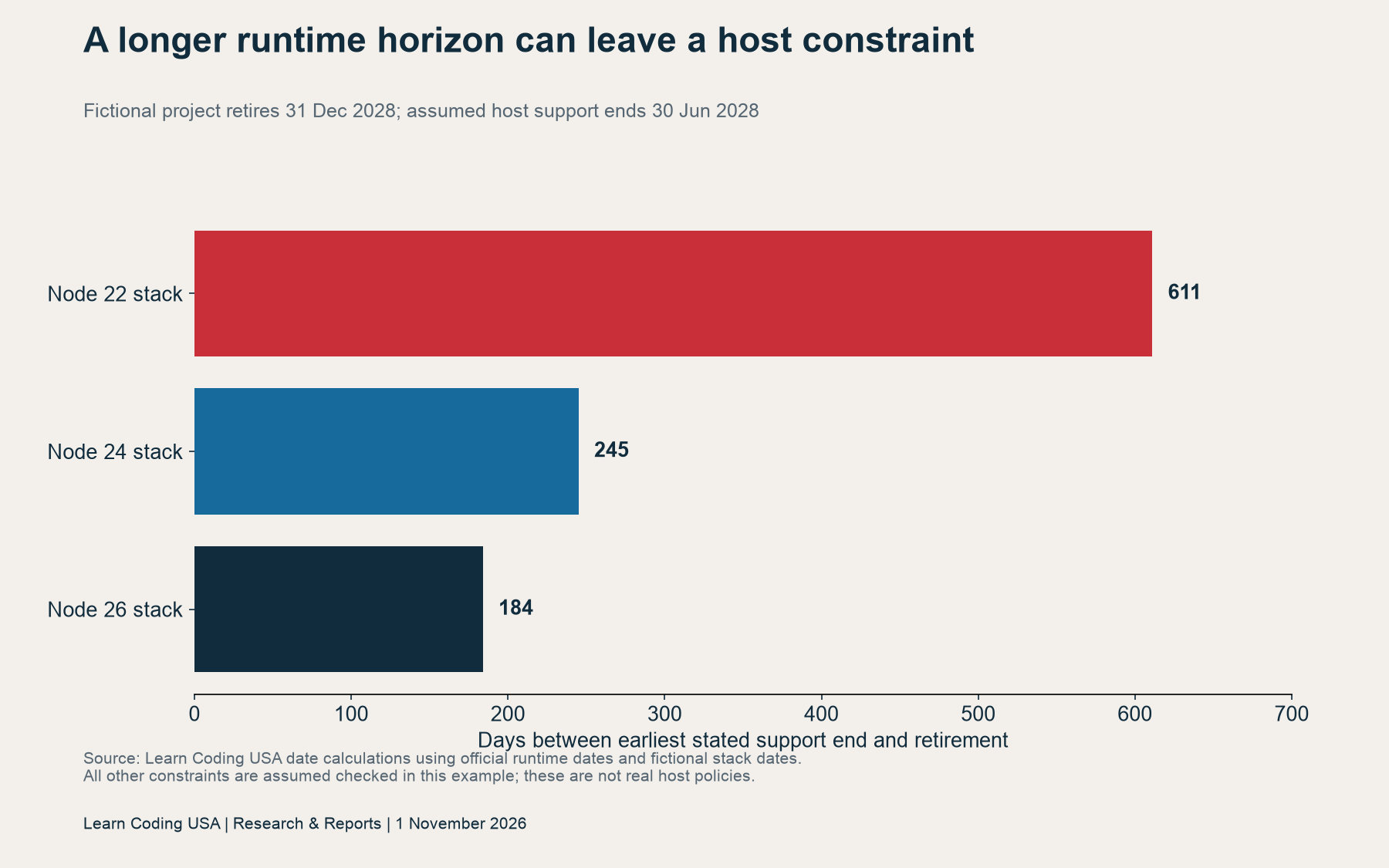
Node 26 extends the runtime horizon beyond this project’s retirement. Nevertheless, the fictional host still ends support first. Switching runtime alone would therefore leave 184 calendar days uncovered by the stated stack dates. The next planning question concerns the host or retirement plan, rather than another runtime comparison.
Change the assumptions and the conclusion can change. That is why the downloadable worksheet exposes each date. It does not assign a universal score to a runtime. Nor does the example describe a real provider’s policy, an expected bill or a tested configuration.
Choose a migration buffer and an owner
A deadline is useful only if someone can act before it. Our fictional worksheet subtracts a chosen 90-day buffer from the earliest stated end. This creates a planning target. The buffer is an editorial example, not an official Node.js requirement or evidence that 90 days will be sufficient.
Tech Consulting Tailored to Your Coding Journey
Get expert guidance in coding with a personalized consultation. Receive unique, actionable insights delivered in 1-3 business days.
Get Started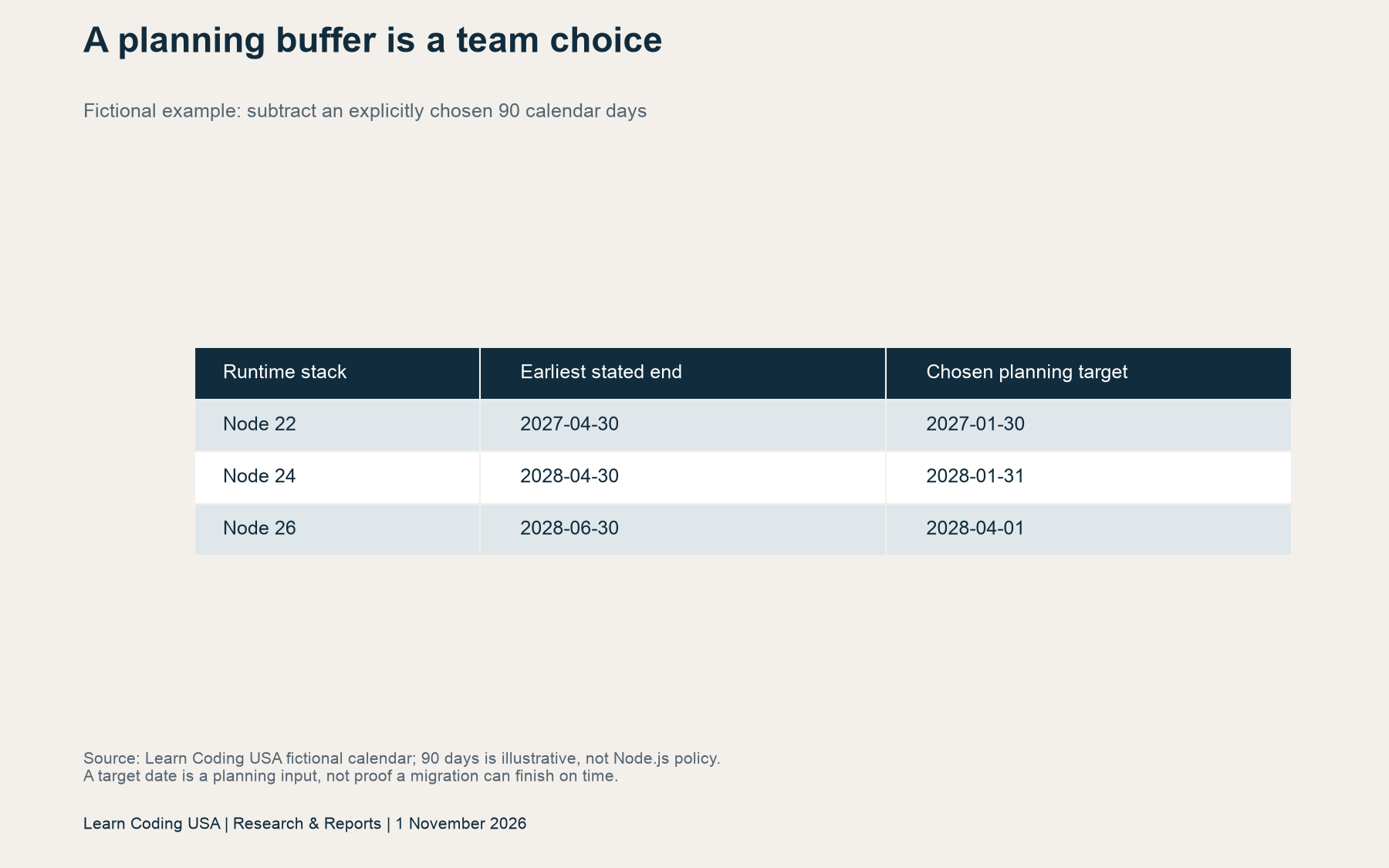
Choose your own buffer with the project’s owner. Consider term dates, review capacity, release freezes and the time needed to test rollback. Then record the choice separately from vendor policy. This prevents a local preference from becoming an apparent external requirement when someone reuses the spreadsheet.
Also write down the trigger for another review. Examples include a revised support calendar, a hosting-policy change or a dependency that drops your chosen runtime. A named maintainer can reassess those changes. An abandoned reminder cannot keep an unattended demonstration current.
Use the downloads and reproduce the calculation
Download the official-date input table and remaining days (CSV), fictional project calendar (CSV) and blank compatibility register (CSV). The first table cites the official schedule. The example labels invented dates. Blank cells in the register are intentionally unresolved.
To reproduce the arithmetic, parse ISO dates as calendar dates. Subtract 1 November 2026 from each scheduled end. For the fictional examples, take the minimum of the runtime, assumed host and assumed framework ends. Subtract that minimum from retirement, retaining zero if the result is negative. Calculate the chosen buffer target separately.
Our calculation uses elapsed calendar-day differences, without adding an inclusive extra day. It assigns no time of day to a vendor deadline. Keep this convention when comparing results. If an actual provider defines a timezone or a precise expiry time, record that policy before planning the final handover.
Limits, related reading and update log
This is lifecycle research for US coding learners and maintainers. The official runtime schedule is global; it is not US employment evidence. We tested no runtime installation, host, framework, native module or migration. A fitting calendar does not establish security, performance, application safety or lower costs.
For a related measurement discipline, see our TypeScript beta benchmark guide. For learning choices, read why deep language knowledge matters. Support planning adds a maintenance decision to those separate questions.
Update log: first published 1 November 2026. Sources checked and date calculations executed on that date. Suggested citation: Learn Coding USA, “Node.js 26 LTS: Choose a Runtime That Outlasts Your Coding Project,” 1 November 2026. Cite the dated input table when reusing the arithmetic and recheck the official schedule before acting.


