




A Rust parallel frontend benchmark should identify the build you actually run. More compiler threads can help some workloads, yet a published speedup is not a forecast for your laptop, cache or project. We tested a small local fixture to show how to keep those distinctions visible.
Our 60 successful checks cover four frontend thread counts and three cache states, with five repeats per configuration. The cold-check medians stayed between 0.456 and 0.486 seconds. This tiny workload did not reproduce Rust’s published whole-project improvement. It is a measurement lesson, not a recommended thread setting.
What changed on nightly, and what did not?
The Rust Compiler Team’s 16 November announcement says nightly-2026-11-14 enables the parallel frontend with two threads by default. Stable remains sequential by default. The team reports an eight-core whole-graph example of 36.7, 35.1, 31.9 and 30.8 seconds at one, two, four and eight frontend threads.
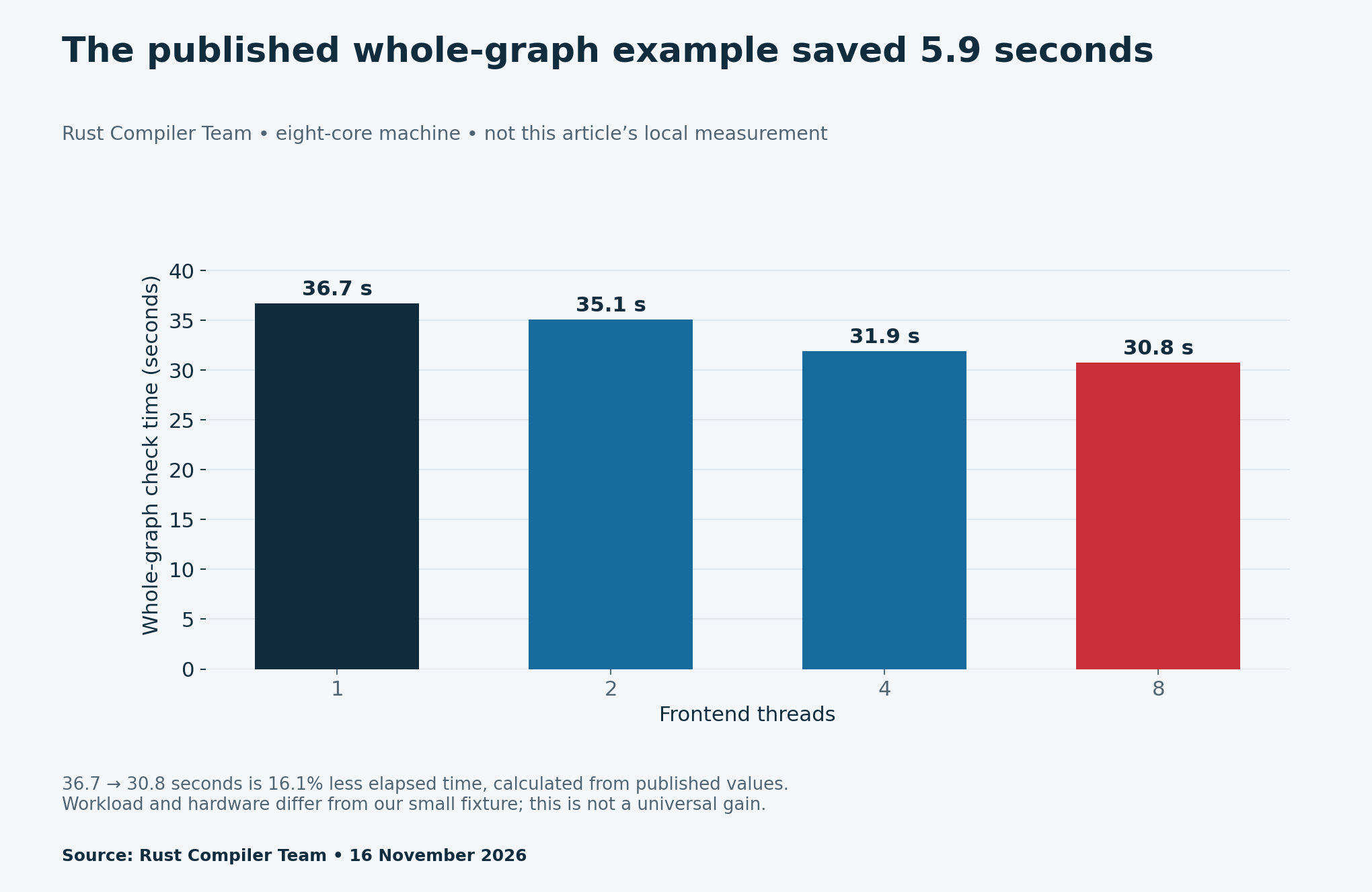
The announcement also warns about memory growth, diagnostic ordering and binary reproducibility. Those limits matter when deciding whether to try nightly. A faster check cannot by itself establish that a release build is reproducible, or that a higher thread count fits your available memory.
Separate Cargo jobs from frontend threads
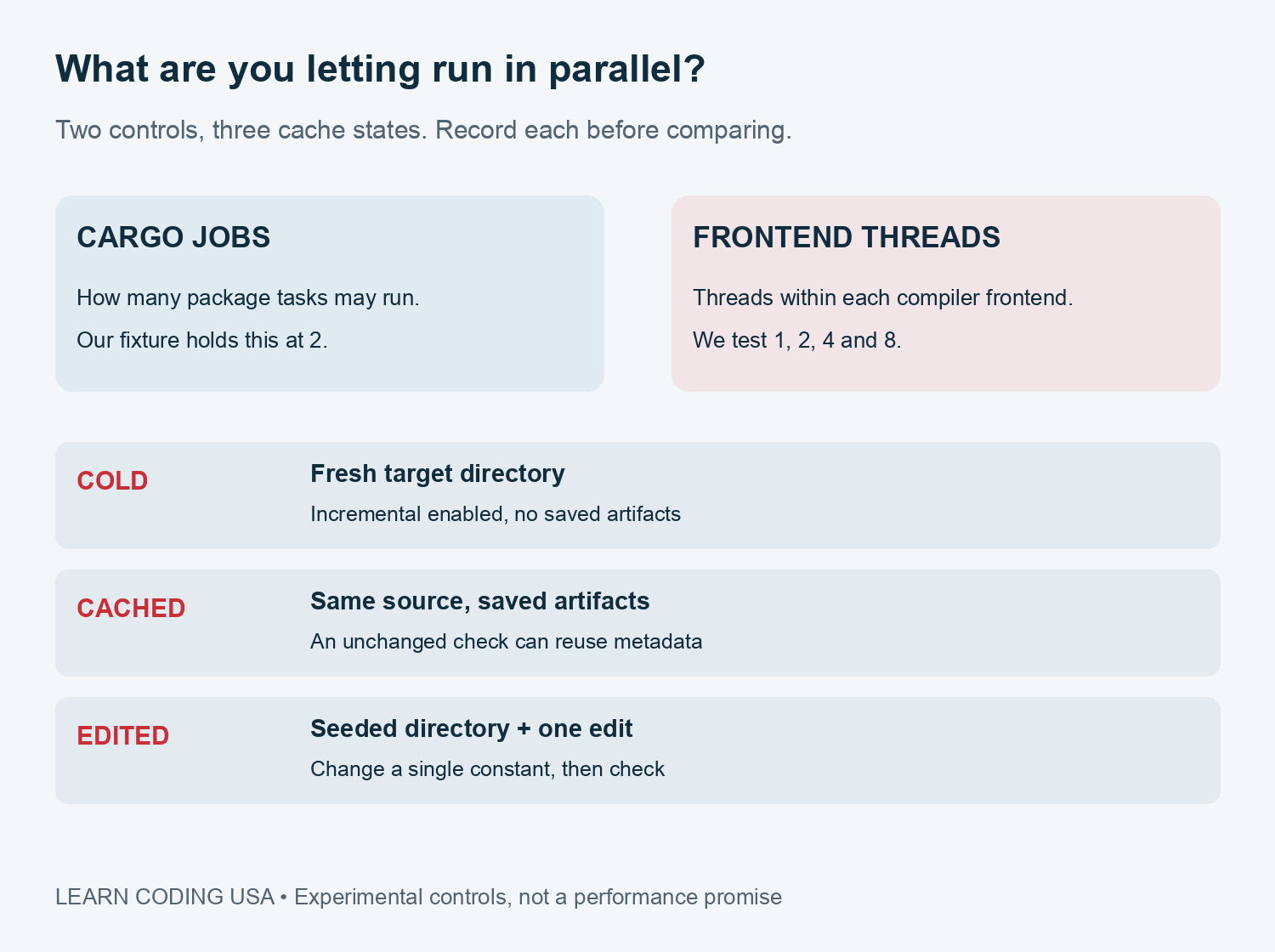
Cargo jobs control concurrent package work. Frontend threads control parallel work inside the compiler frontend. They are separate settings. If you change both together, a timing difference cannot tell you which change mattered. For our experiment, Cargo jobs stay fixed at two while frontend threads vary.
The Cargo configuration reference documents build jobs and compiler flags. Our runner passes --jobs 2 to Cargo and sets RUSTFLAGS="-Zunstable-options --jobs-frontend=N". It pins the same nightly for every run. These experimental compiler options should not be assumed to work on stable.
Define the workload before starting the stopwatch
We generated eight independent local crates with 600 simple functions each. Every function uses an Option value and a map operation. There are no third-party dependencies or network requests during the timed checks. This deliberately small workspace is not the Cargo project used in the published example.
The compiler is rustc 1.102.0-nightly, commit 5f4effd579500175af844241eb179e756190f1e7, from nightly-2026-11-14. Its host is aarch64-apple-darwin. The native shell reports arm64; the translated Python timing process reports x86_64 and ten logical CPUs. The kit records those details rather than calling the machine simply “a Mac.”
We used cargo check --workspace --offline --locked with incremental compilation enabled. The cargo check manual explains that checks store metadata and skip final code generation. Consequently, these timings are not complete executable-build times and do not measure runtime application performance.
Run cold, cached and edited checks separately
Each cold repetition uses a fresh target directory. The unchanged cached configuration gets an untimed seed check, then five checks without a source edit. The incremental configuration also starts with a seed, but changes one constant in one crate before each measured check. Each thread count has its own cached directories.
We time the full subprocess from Python, including process-launch overhead. The order is fixed: cold, unchanged, edited; then one, two, four and eight threads within each mode. The Mac remains in normal shared use. We did not randomize order or control temperature, power mode and background work.
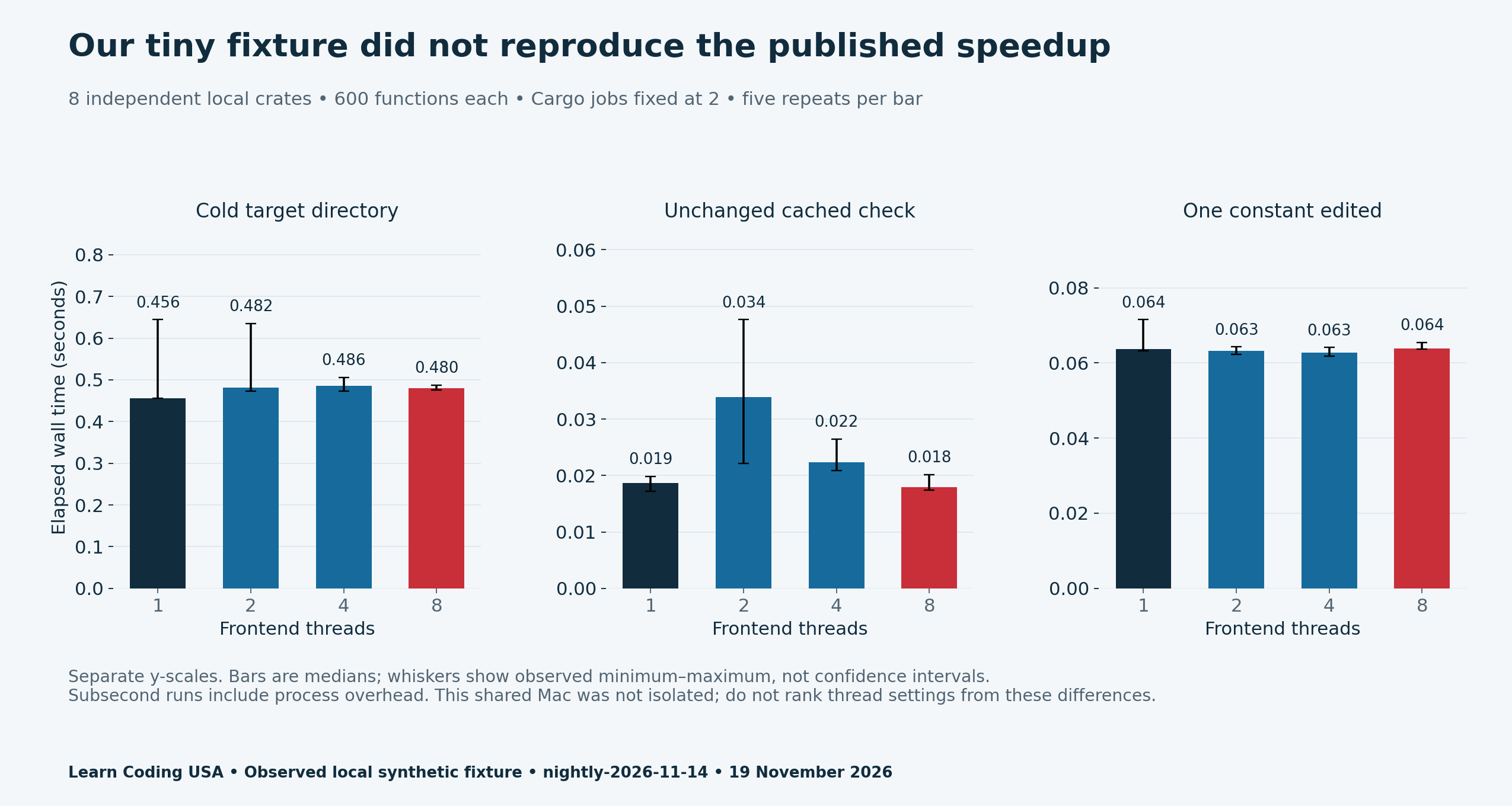
| Mode | 1 thread | 2 threads | 4 threads | 8 threads |
|---|---|---|---|---|
| cold | 0.4562 s | 0.4816 s | 0.4860 s | 0.4800 s |
| warm | 0.0187 s | 0.0339 s | 0.0224 s | 0.0180 s |
| incremental | 0.0637 s | 0.0632 s | 0.0627 s | 0.0639 s |
Read this Rust parallel frontend benchmark cautiously
The cold-check median was 0.4562 seconds at one thread and 0.4800 seconds at eight. Those values describe this fixture in this session. They do not establish that parallel frontend compilation is generally slower. At this scale, launch overhead, cache effects and ordinary machine noise can dominate the work being studied.
Cached checks ranged from roughly 18 to 34 milliseconds by median. That is a different question from checking fresh source. The edited checks had medians near 63 milliseconds. Combining all three modes into one average would hide the much larger effect of what work was actually required.
Peak memory is not available in our results. The system timing utility could not collect its requested resource statistics in this execution context, so we removed that wrapper and reran the full timing matrix. Blank memory cells mean unmeasured, not zero. We make no memory-efficiency comparison.
Download the complete Rust parallel frontend benchmark kit
- All 60 local check observations (CSV)
- Local medians and observed ranges (CSV)
- Separately labelled Rust team example (CSV)
- Blank workload and timing ledger (CSV)
- Fixture, runner, logs and machine record (ZIP)
Repeat on the project you need to understand
Start with a fixed source commit, lockfile and toolchain. Choose a check or build command that matches your real feedback loop. Repeat each configuration, keep cache states separate and inspect failed runs before summarizing successful ones. Record the editing rule for incremental work, because a different edit can change the work required.
Tech Consulting Tailored to Your Coding Journey
Get expert guidance in coding with a personalized consultation. Receive unique, actionable insights delivered in 1-3 business days.
Get StartedUse a fresh output directory when reproducing the cold tests. Read the included script and adjust its toolchain paths for your installation. The rustup installation guide explains custom toolchain locations. No credentials, paid services or external project dependencies are needed for our fixture.
For related evidence habits, see our browser build-recording guide and review-age calculation worksheet. A useful result names its inputs and its limits. Choose a compiler setting for your measured workload, then recheck when that workload changes.


