






An ACCESSIBILITY.md portfolio project file is useful when a reader can trace its claims to actual evidence. A statement can describe tested tasks, known barriers and what remains unknown. The filename itself does not prove that someone can complete a task, and it does not provide an accessibility certification.
Our original template connects a statement to a task-level ledger and issue records. A fictional nine-cell matrix shows how to retain pass, fail and untested results without quietly turning gaps into successes. No accessibility test of a demo or real portfolio project was executed for this article.
What GitHub changed on 5 November
GitHub’s 5 November 2026 announcement says repository overview pages now recognise ACCESSIBILITY.md in the root, .github or docs directory. A repository can also inherit an organisation statement. The feature makes information easier to find; it does not assess or certify the project’s accessibility.
Keep the publishing decision separate from the evidence decision. You can publish an honest statement while important combinations remain untested. Describe those limits explicitly. A visitor who encounters a barrier needs a usable reporting route and accurate context more than a broad promise that cannot be supported.
Use the older WebAIM evidence with its correct scope
As older background, WebAIM’s February 2026 evaluation of one million homepages found an average of 56.1 detected errors per page and detected WCAG failures on 95.9% of pages. The global homepage study is neither a US-only developer sample nor a measurement of GitHub projects. It predates the November feature.
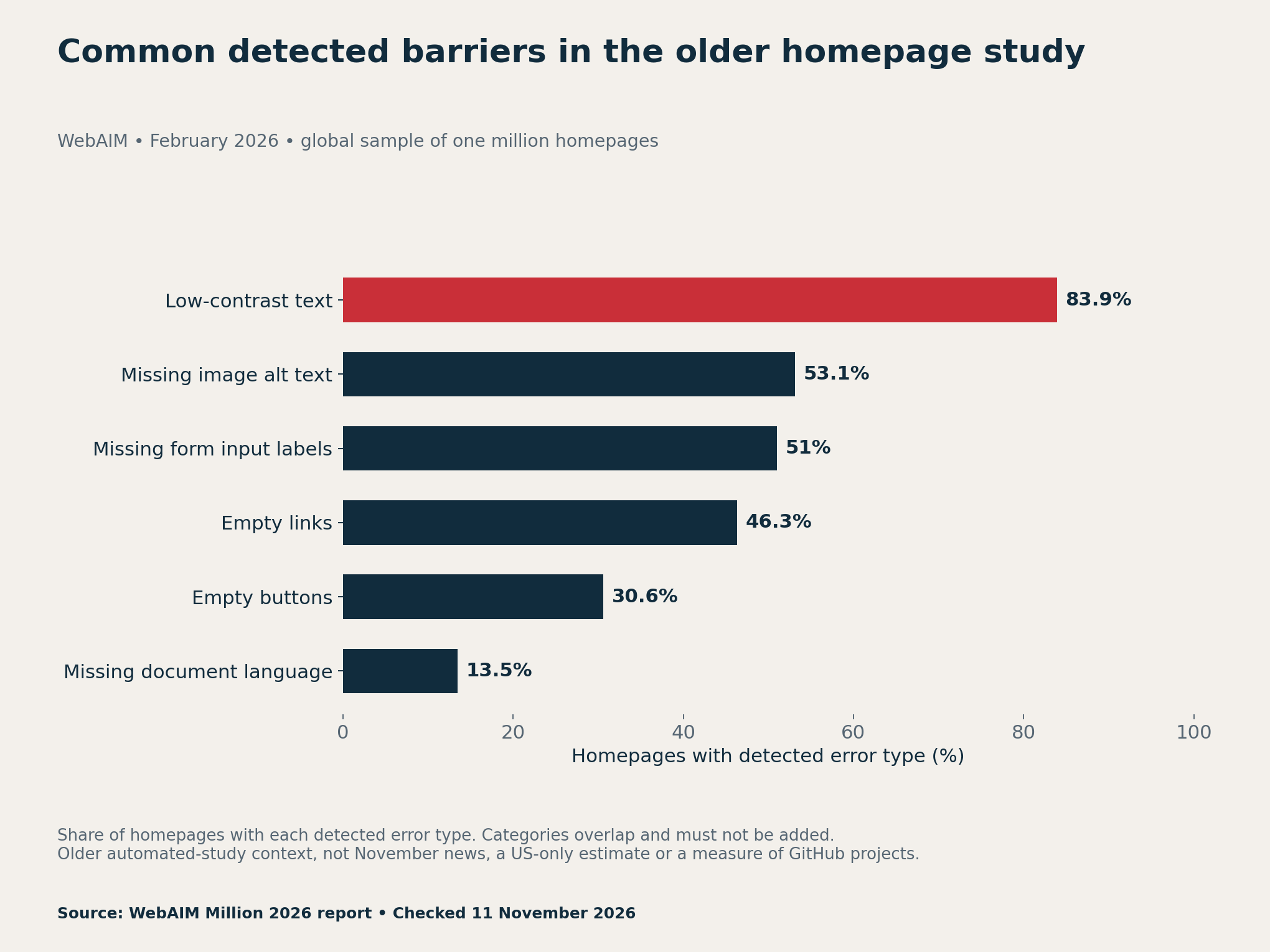
The practical lesson is to define evidence methods, not to assign those percentages to your own work. An automated check can reveal some barriers, but it cannot answer every task question. A statement should make the tested scope clear and leave manual and assistive-technology checks visible as their own work.
Start with the tasks a visitor needs to complete
For a small portfolio app, choose a short, explicit task list. Our planning ledger uses navigating a menu, submitting a form and recovering from an error. Adapt those tasks to your actual product. A calculator, command-line utility and content site will need different actions and environments.
Define completion before testing. For example, “recover from an error” could require reaching the message, understanding which field needs attention, correcting it and resubmitting without losing unrelated input. State that sequence in the test instructions. A page loading without a console error is not evidence that the sequence succeeds.
Record the revision and page or feature scope. A result from last week’s form should not silently cover today’s rewritten dialog. Keep personal test notes separate from public evidence when they contain private details. A reviewer alias can identify a record without exposing a person’s disability or unrelated history.
Link each claim to a ledger row and a limitation
A useful test row names the task, method, browser, operating system, relevant assistive technology, version, date, result and evidence reference. Add the barrier, workaround and issue link when relevant. Keep a blank field visibly unresolved rather than assuming that an omitted environment was tested.
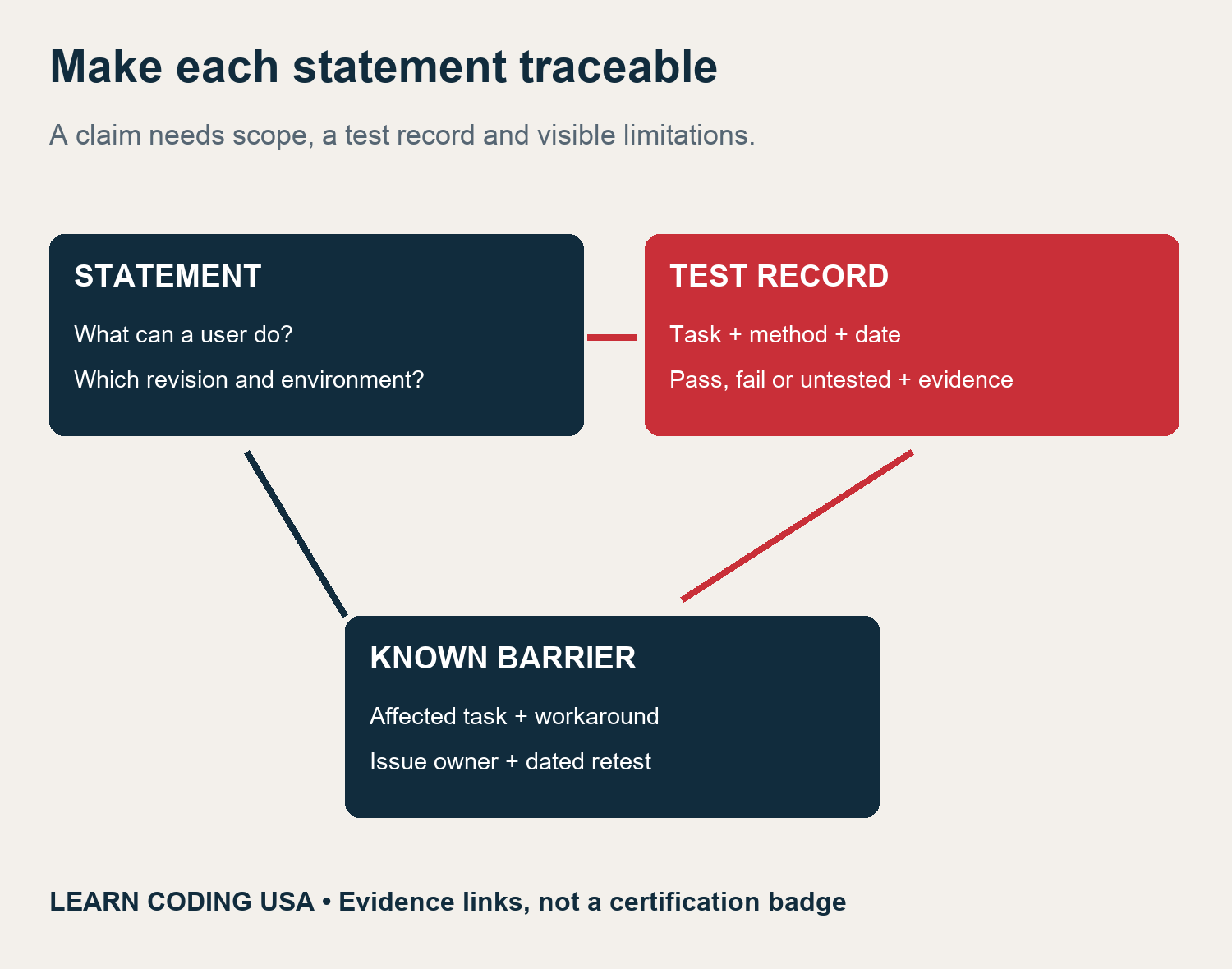
W3C’s accessibility-statement guidance is a useful primary reference when deciding what information to include. Our downloadable wording is an original project template. Replace its placeholders and choose commitments you can actually maintain before making it public.
Keep automated, keyboard and assistive-technology checks separate
The three methods answer related but different questions. An automated result can identify a detectable issue in the tested scope. Keyboard interaction can expose a blocked task or missing focus. A named assistive-technology combination can reveal how labels, order and changes are presented in that environment.
W3C’s Easy Checks resource describes an initial review rather than a comprehensive accessibility evaluation. Do not turn a short checklist into a claim of full conformance. Likewise, testing one browser and screen-reader combination does not establish the outcome for every version or platform.
Our blank ledger begins with every planned row marked untested. Change a row only after carrying out the stated method and retaining evidence. If a test is blocked, explain the blocker. If the plan changes, retain the original scope decision so readers can understand why a combination is missing.
A nine-cell example that does not hide unknowns
The fictional example crosses three tasks with three methods, producing nine planned cells. We chose four pass statuses, two fail statuses and three untested statuses. The assistive-technology column remains entirely untested. These are synthetic teaching labels, not observations from a functioning app.
Tech Consulting Tailored to Your Coding Journey
Get expert guidance in coding with a personalized consultation. Receive unique, actionable insights delivered in 1-3 business days.
Get Started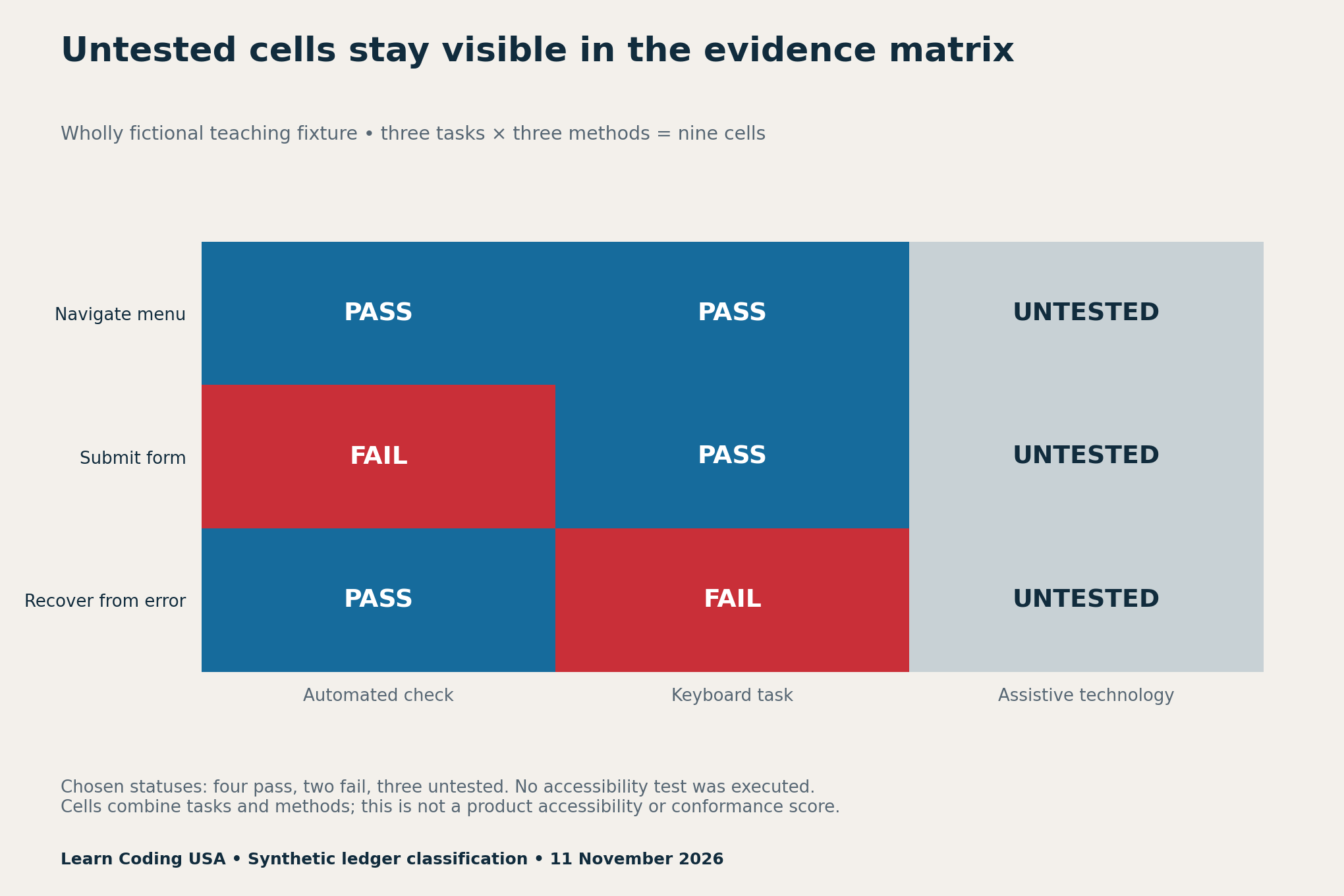
Six of nine cells have a chosen tested status, or 66.7% of the planned cells. Four of nine are labelled pass, or 44.4%. If you divide only by the six non-untested cells, four of six gives 66.7%, which answers a different question. None of these figures measures WCAG conformance or the percentage of users who can use the product.
The distinction matters because the same visual summary can look better when unknowns are removed. Preserve the full planned denominator, show failed rows and explain the method mix. Task-method cells are not independent users or equally important defects, so avoid ranking unrelated projects by this small matrix.
Replace universal claims with bounded descriptions
| Unsupported wording | More useful evidence-based wording |
|---|---|
| Fully accessible to everyone | Name the evaluated tasks, revision, methods, date and remaining gaps |
| Screen readers work | Name tested combinations; keep others explicitly untested |
| No scanner errors means compliant | Report the limited scan result alongside other checks and limitations |
| This issue is fixed | Link the changed revision and a fresh dated retest |
A target and a verified claim are different. You may name a standard and level as a goal while explaining that a complete conformance evaluation has not been conducted. Do not borrow a certification badge or imply independent assessment simply because a template contains a standards heading.
Provide a reporting route without demanding sensitive details
Offer a contact route that a visitor can use if the affected feature is inaccessible, with an alternative where feasible. Invite the task, page, observed behaviour and relevant environment. Do not require a person to disclose a disability, provide credentials or publish private material to have a barrier considered.
Keep screenshots and recordings optional. Explain how a maintainer reviews, tracks and updates reports using a process the project can sustain. Avoid promising a response time that no one can maintain. If a workaround is available, describe it clearly and retain the unresolved limitation until retesting supports a change.
Download the statement and evidence tools
- Older WebAIM source-context values (CSV)
- Blank task and environment ledger (CSV)
- Fictional nine-cell status example (CSV)
- Statement claim-audit worksheet (CSV)
- ACCESSIBILITY.md template and wording example (ZIP)
The ZIP contains editable text templates with visible placeholders. The blank ledger is ready for your own evidence. The worked matrix is deliberately fictional. If you share the example, preserve those labels so no reader mistakes it for a completed audit of your project.
For planning a broader review comparison, see our AI browser testing benchmark. For another approach to retaining reproducible inputs and limitations, use the AI data-analysis project. Those resources do not replace accessibility testing.
Method, maintenance and citation
Research checked 11 November 2026. The fresh GitHub announcement and older WebAIM context are kept separate. We transcribed the source values, constructed the original nine-cell teaching fixture and executed its status counts and denominator calculations. No demo testing, user study, independent accessibility audit or legal compliance determination was performed.
After a change, append a new dated test rather than erasing the old failure. Update the statement’s scope and known-barrier links as evidence changes. Suggested citation: Learn Coding USA, “ACCESSIBILITY.md Portfolio Project: An Evidence Template,” 11 November 2026. Credit the primary sources for their findings and this report for the templates. Send evidence-backed corrections through our contact page.


