




VS Code Dev Container chat history after rebuild depends on where the state lives and when the container was created. The new experimental state-volume option is not a promise that a first rebuild will rescue older sessions. Check the feature prerequisites and creation boundary before relying on it.
This report provides a source-backed storage comparison and a blank twelve-observation test plan. We did not create a chat session, rebuild a Docker container or measure retention. Every observation field remains marked Not run. The useful output is a controlled way to separate expected behavior from evidence you have actually collected.
What the November release says—and what the guide adds
The 18 November VS Code 1.147 release notes describe experimental chat persistence using a Docker volume for a new Dev Container’s user and agent state. They list editor and Agents-window settings. The important boundary is creation with the relevant setting already enabled.
The current Dev Container guide adds a stronger caution: enabling the feature does not add a volume to an existing container. Its first rebuild adds one but can still lose sessions stored only in the old container. The feature does not recover sessions that were already lost.
The same guide currently asks testers to use VS Code Insiders. For the editor workflow, it also specifies the pre-release Dev Containers extension, version 0.474.0 or later. A stable release announcement and those current testing prerequisites answer different questions. Record the actual channel and extension before attempting the comparison.
VS Code Dev Container chat history after rebuild: settings
| Interface | Relevant user setting |
|---|---|
| Editor with Dev Containers extension | dev.containers.stateVolume.enabled |
| Agents window | chat.agentHost.devContainer.stateVolume.enabled |
The AI settings reference also identifies the Agents option as experimental and scoped to newly created containers. Keep the exact setting names as strings in the evidence card. Do not substitute a similarly named container option or infer that one interface’s setting configures the other.
Separate the three storage surfaces
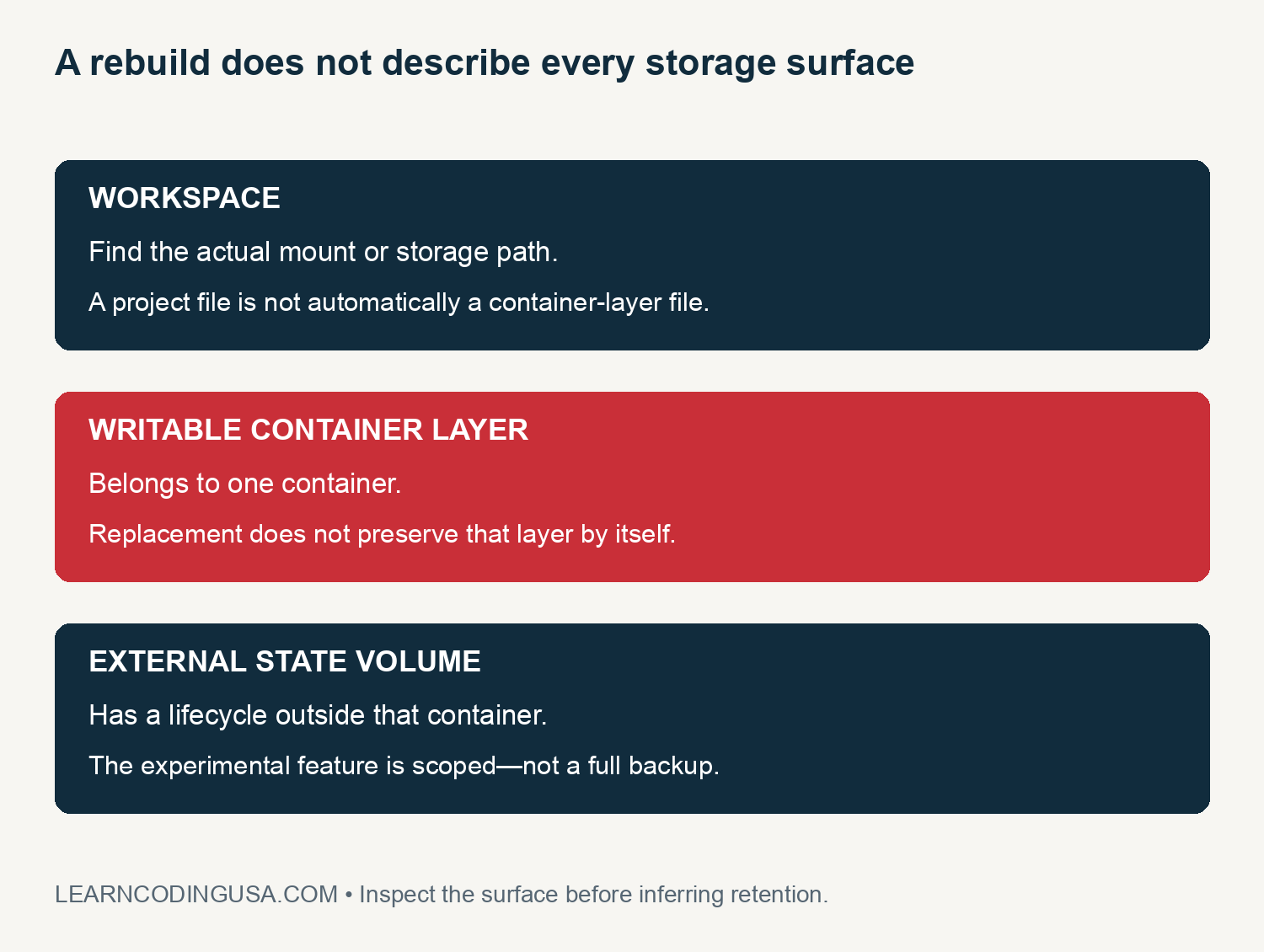
Docker’s storage guide distinguishes the container writable layer from mounted storage. A workspace file may be on a bind mount, a volume or another arrangement. Read that arrangement rather than assuming that everything visible inside the container belongs to its disposable layer.
The volume reference explains that a volume can outlive a container. That separation is useful, but it is not another machine or an independent recovery copy. The existence of a volume does not prove that a particular chat was stored there or that a later interface can reopen it.
Use three invented markers: a small workspace text file, a file deliberately placed in the disposable writable layer and a synthetic chat message where the product supports it. Give each a distinct identifier. Never use real conversations, private repository files or credentials to demonstrate persistence.
A matched comparison with twelve observation cells
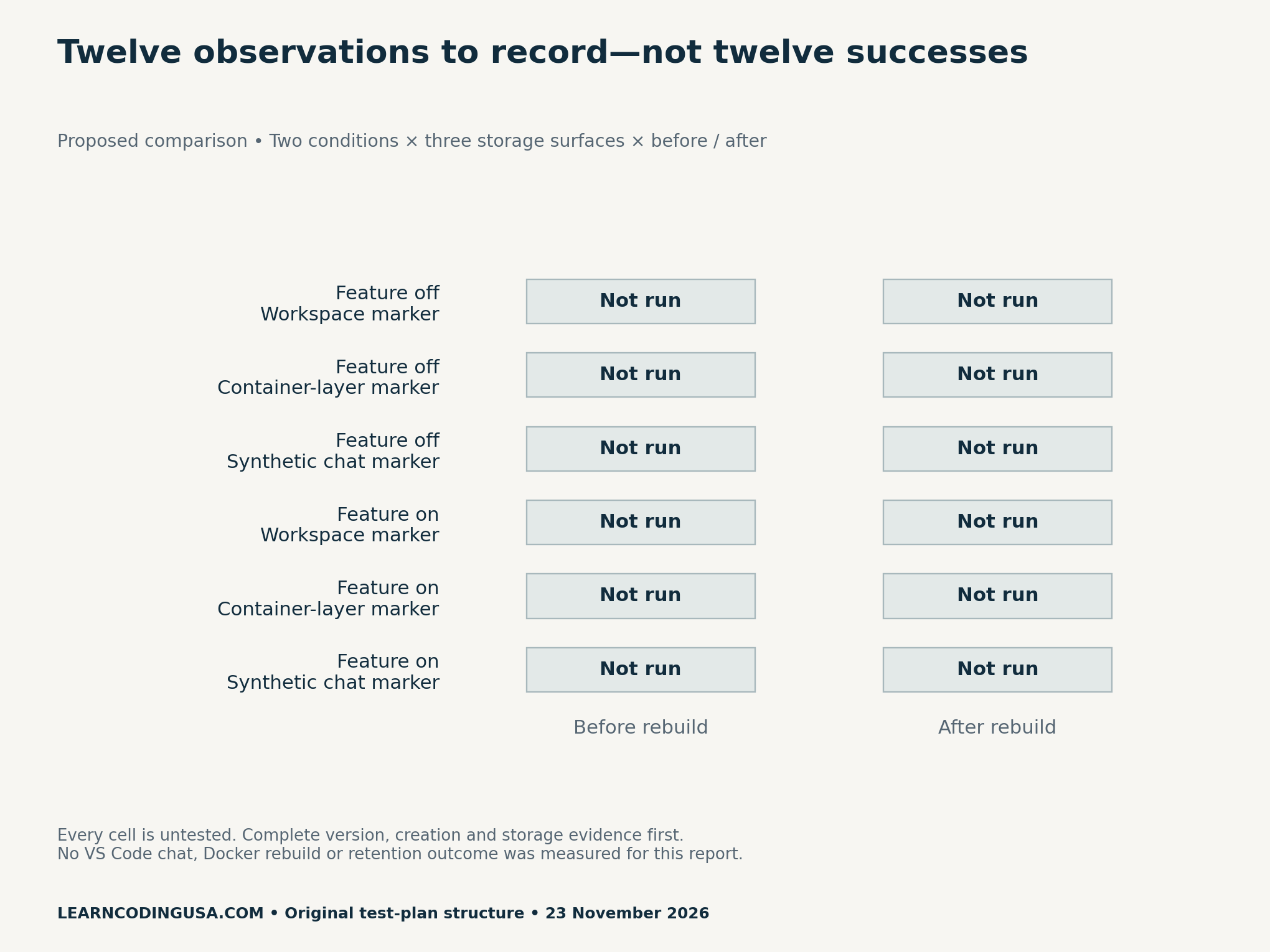
Create two separate disposable projects with otherwise matched versions and setup. Record the feature-off condition and the feature-on condition before their new containers are created. Then record the three markers before an ordinary rebuild and again afterward. Keep the container identities so a restart is not mistaken for replacement.
The twelve cells are a planning denominator. They are not twelve independent experiments, twelve users or twelve successful restores. Each condition contains the same three surfaces at two moments. A missing marker, unavailable feature or unsupported chat must remain an unresolved observation with its reason.
Do not run a volume-removal command as part of this test. Rebuilding a disposable teaching container is enough to ask the intended question. Deleting storage would introduce another operation, with different consequences, and would no longer test the ordinary rebuild alone.
Keep a retention claim narrower than the evidence
Record the exact marker that reappeared, its interface and the observation time. A visible chat title alone is weaker evidence than opening the synthetic session and finding its marker. Likewise, a file with the same name is not enough if its contents changed. Keep a small content check without copying unrelated files.
If the feature cannot be enabled under your current channel or extension, mark the branch Not run. Do not replace an unperformed test with the expected result from documentation. A reproducible teaching plan stays useful when it preserves those limits, particularly while an experimental feature is changing.
A successful local comparison would still leave cross-machine synchronization, complete backup, recovery after volume loss and behavior for older containers unanswered. It would also not prove which unrelated files or settings persist. Give each broader question its own evidence rather than extending one observed marker to the whole environment.
Tech Consulting Tailored to Your Coding Journey
Get expert guidance in coding with a personalized consultation. Receive unique, actionable insights delivered in 1-3 business days.
Get StartedDownloads, method and reuse
Research checked 23 November 2026. We compared Microsoft’s release note, current feature guide and settings reference with Docker’s storage documentation. The three-surface model and twelve-cell worksheet are original editorial tools. No authenticated chat state, Docker volume or existing development installation was inspected or changed.
The version card captures channel, extension, interface, both setting fields and container identities. The storage sheet separates a documented lifecycle rule from the observation still needed. The source register keeps the first-rebuild warning beside the more general release announcement so it is not lost in a shortened summary.
For another evidence-separation example, see our Git installation inventory. A terminal result does not identify every application’s executable, just as a surviving workspace file does not establish chat retention. Our virtual-environment report applies the same habit to project tooling.
- Twelve-cell before-and-after test plan (CSV)
- Blank version, setting and container card (CSV)
- Storage-surface scope and unresolved checks (CSV)
- Primary-source and claim register (CSV)
Suggested citation: Learn Coding USA, “VS Code Dev Container Rebuild: Which Chat State Survives?”, 23 November 2026. Describe the matrix as a proposed, unrun test plan and cite Microsoft for feature behavior. Send evidence-backed corrections through our contact page.


