




Soft navigation Web Vitals can reveal route changes that an initial page-load report misses. However, a lower dashboard number does not establish that your application became faster. Before celebrating an improvement, check which events entered the calculation.
This research guide separates a new vendor case study, our own synthetic arithmetic and a proposed browser protocol. It provides five figures and four CSV tools. We executed the arithmetic only. We ran no application, browser benchmark or monitoring SDK experiment.
What the soft navigation Web Vitals report says
In its 29 October engineering case study, Sentry reports a 30-day observation of its own app. It gives p75 Largest Contentful Paint of 2.48 seconds across all navigations and 1.17 seconds for soft navigations alone. Exact calendar boundaries and the event counts behind these percentiles are not supplied.
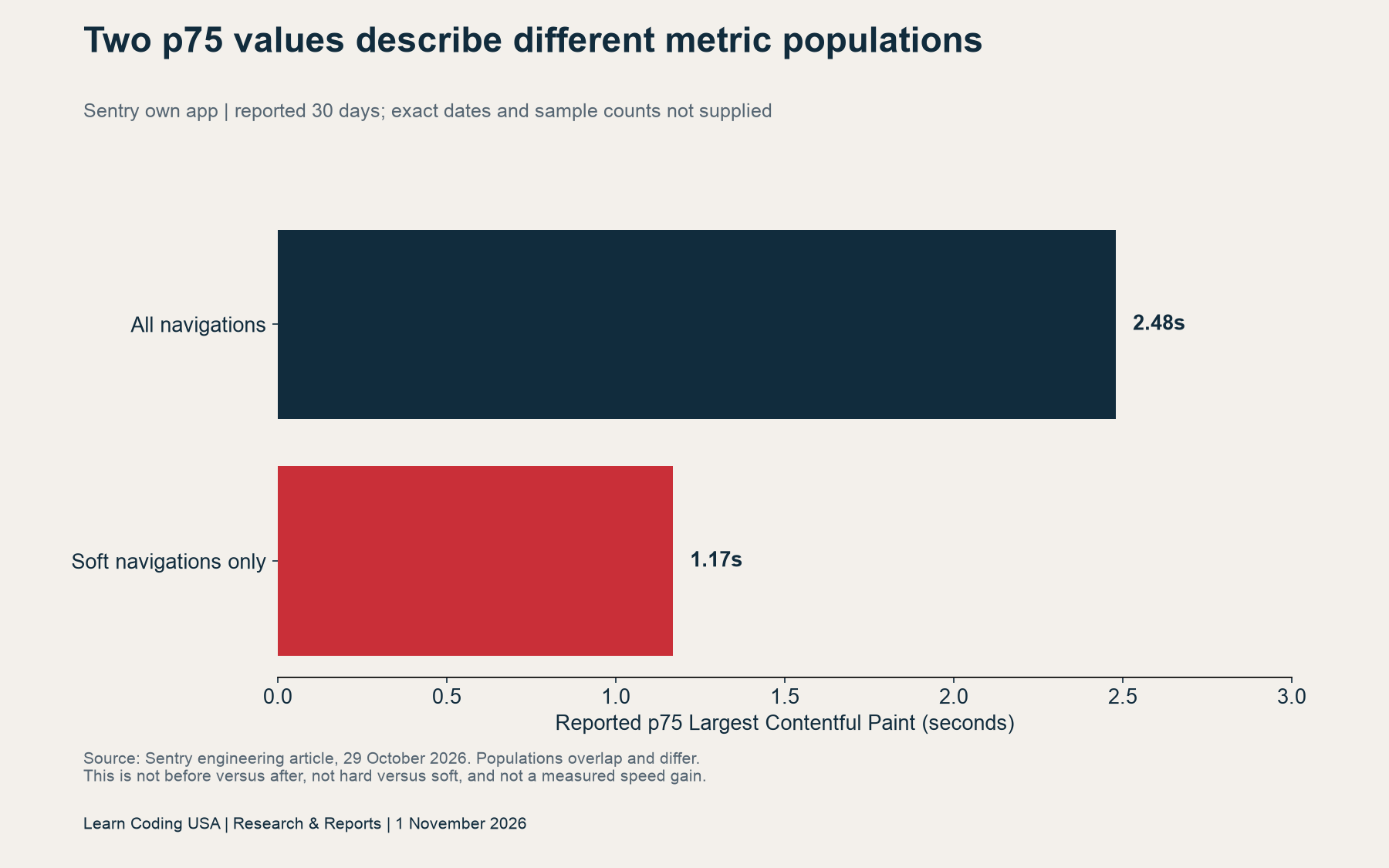
These populations overlap: the all-navigation group includes soft navigations. They are not “before” and “after,” nor separate hard-only and soft-only groups. Therefore, subtracting the two values would not measure an optimization. The source also warns that page-load thresholds do not provide a fair comparison for soft-navigation scores.
Sentry reports that about 62% of its page views were soft navigations. Separately, about three in four Chrome route changes qualified for measurement. Its article describes current support as Chromium 151 and later. These observations concern one vendor’s app, not all single-page applications or a representative US audience.
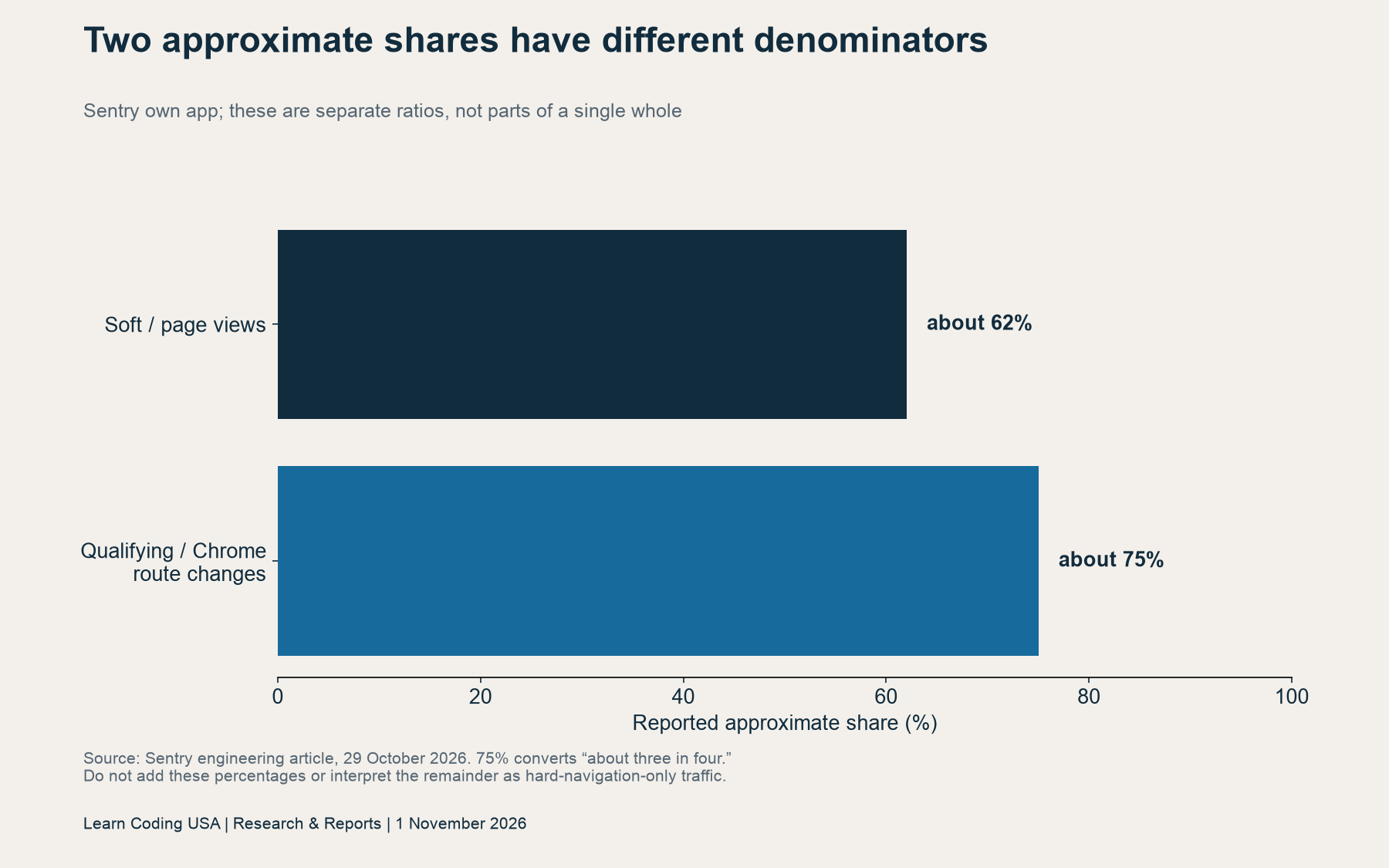
The two percentages use different denominators. One concerns page views; the other concerns Chrome route changes. You cannot add them, subtract one from the other or use their remainder to estimate hard-navigation traffic. A useful report keeps each definition beside its number.
Define the event before measuring its speed
Chrome’s official documentation describes a soft navigation through user action, a visible URL change and a visible paint. It also notes browser and version limits. A router’s route-change event therefore does not automatically establish a qualifying browser measurement.
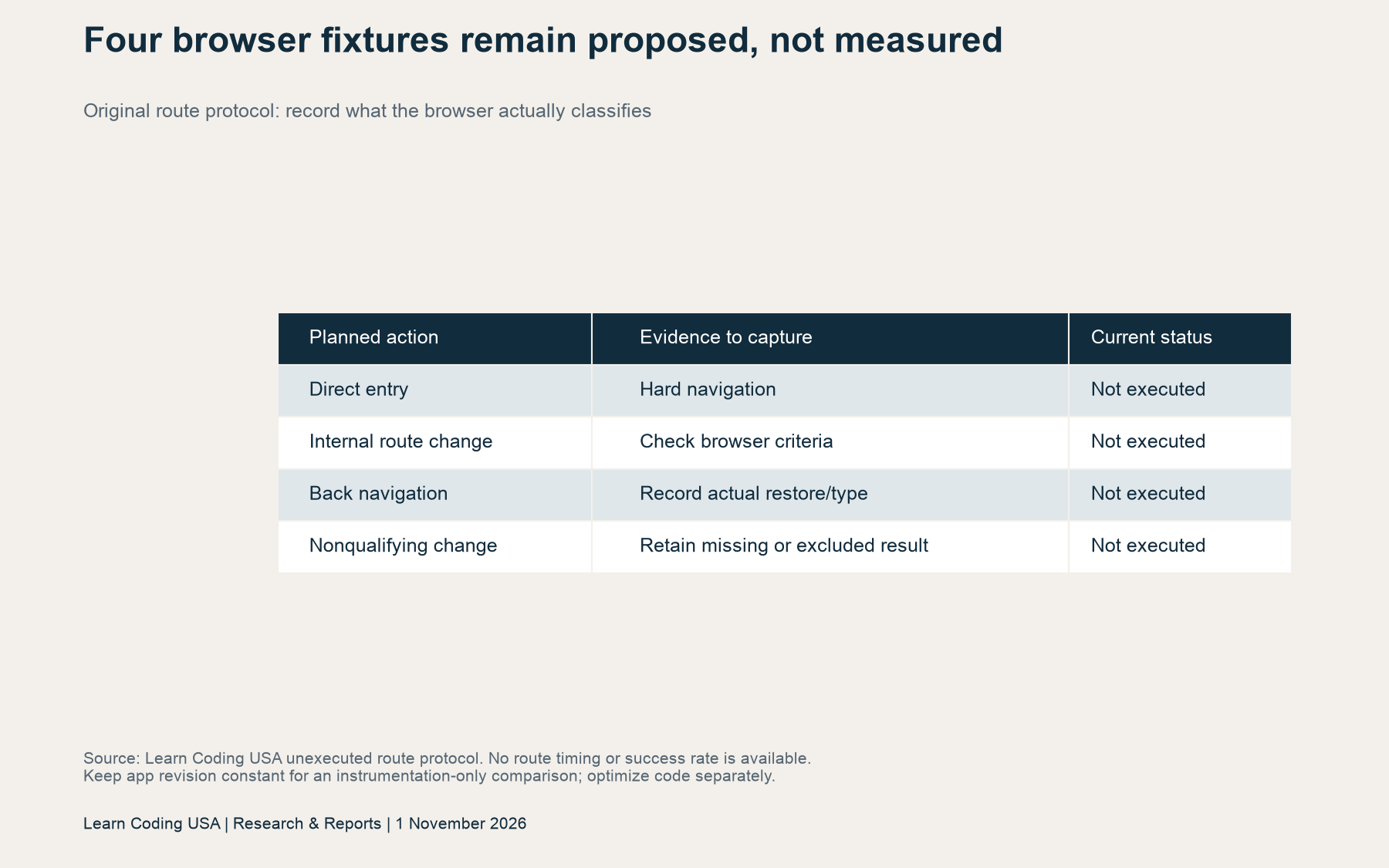
For your project, record both the intended action and the observed navigation class. Keep direct entry separate from an internal transition. Also record what happened on back navigation. The browser may restore a page or load it again, and a useful ledger preserves the observed result rather than forcing it into your expected category.
Next, record the route template, browser version, SDK version and application revision. Declare the observation window and sampling rule before comparing periods. Use route templates instead of account identifiers or sensitive query parameters. An event log should explain the measurement while collecting only the information it needs.

Audit coverage before interpreting a percentile
Our original teaching fixture contains ten invented event rows. Four hard-navigation attempts are eligible and have recorded values. Five soft-navigation attempts are eligible, but only four have a value. One further attempt represents an unsupported browser. These are author-written inputs, not captured traffic.
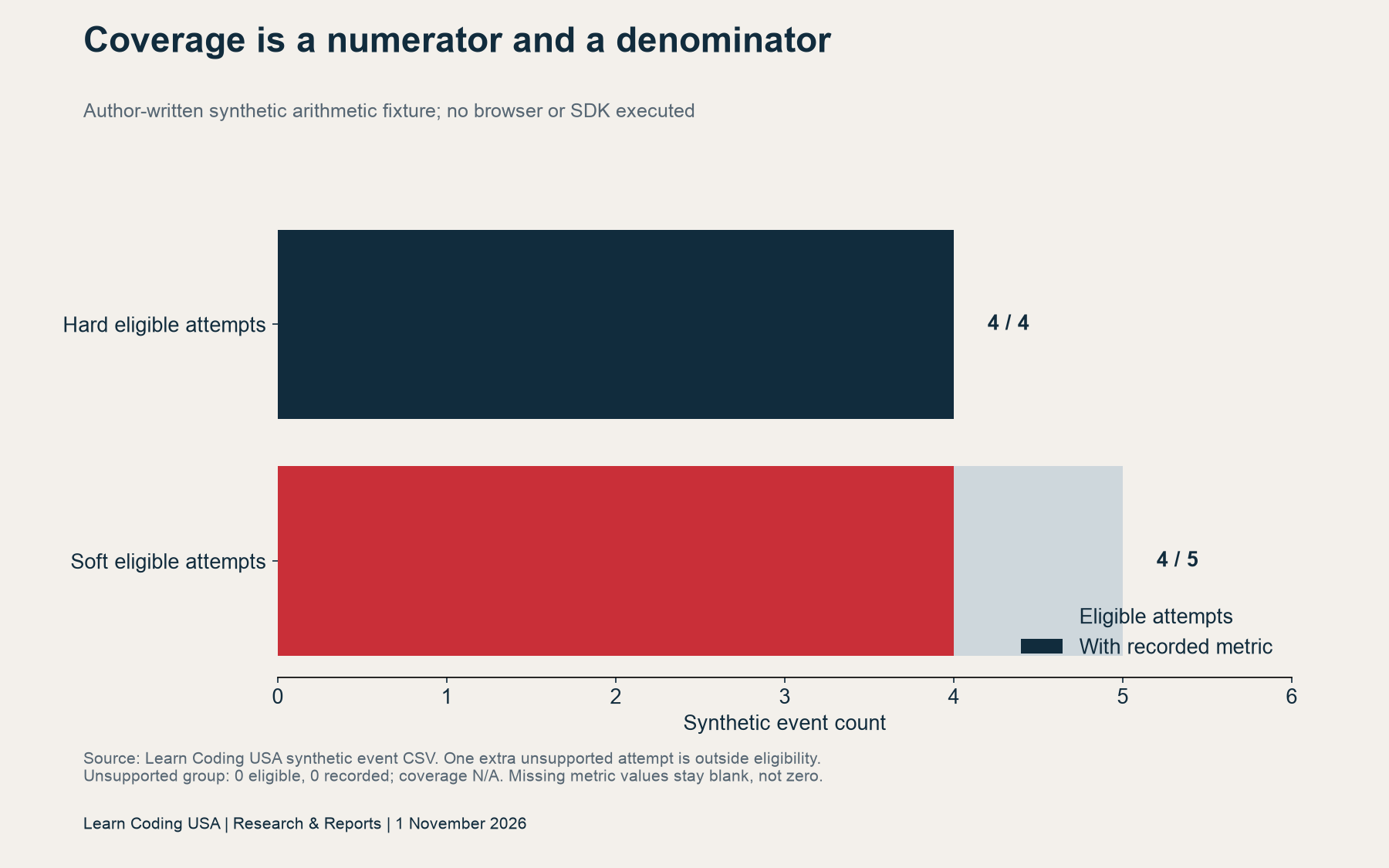
The resulting coverage is 4/4 for the hard group and 4/5 for the soft group. The unsupported group has no eligible observations, so its coverage is not applicable. Reporting it as a zero-millisecond load would invent a performance measurement. Reporting all three groups together would hide the reason a value is missing.
In a real investigation, distinguish an unsupported event, an excluded event and an eligible event whose collection failed. Each needs a different explanation. A percentile based on the remaining values can still be calculated, but the missingness limits its interpretation. Put the numerator, denominator and missing reasons beside the result.
Recompute p75 from events, not group summaries
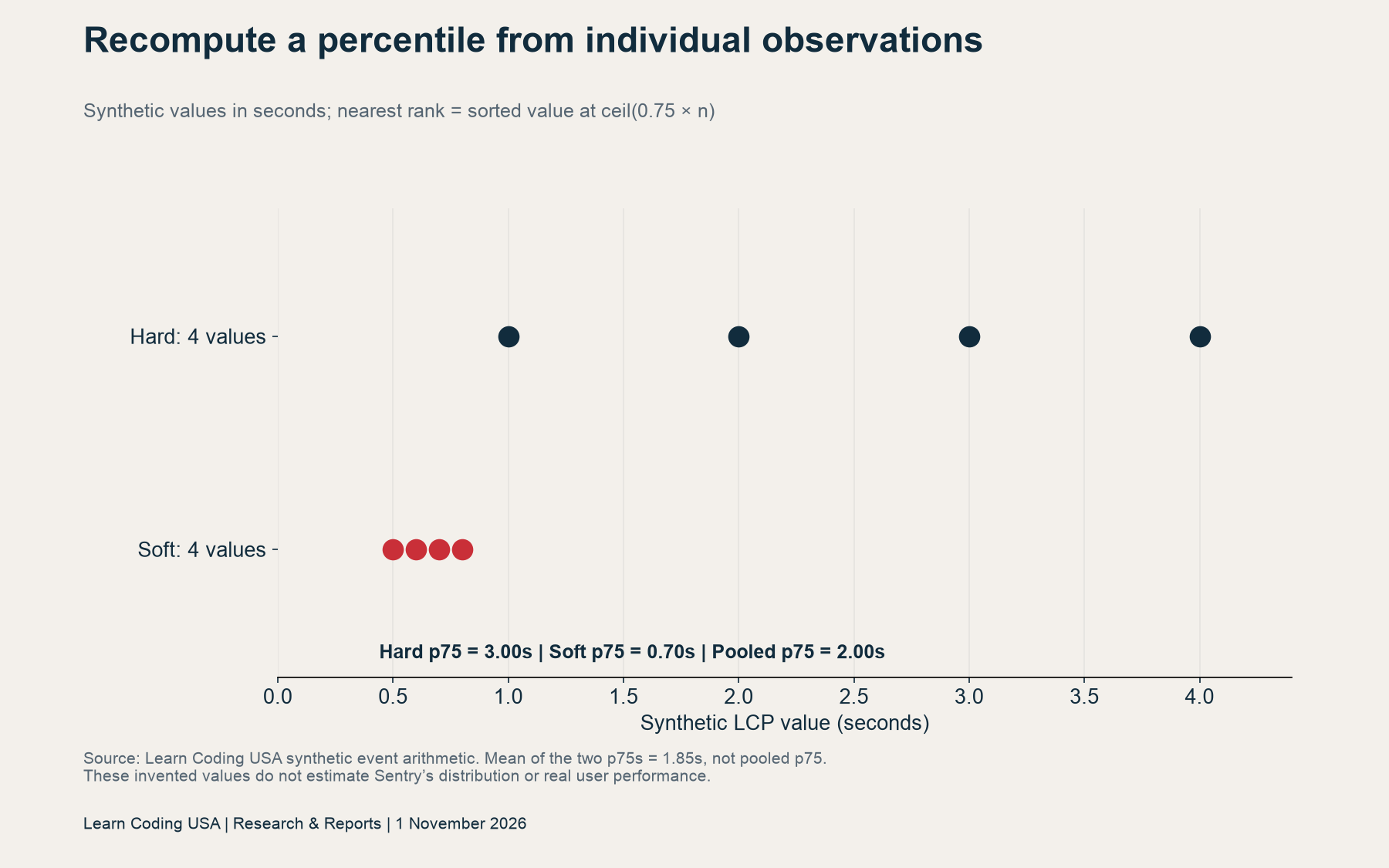
Our synthetic hard-navigation values are 1, 2, 3 and 4 seconds. The synthetic soft values are 0.5, 0.6, 0.7 and 0.8 seconds. We use the nearest-rank convention: sort the values and select the one at the ceiling of 0.75 times the sample size, counting positions from one.
| Synthetic calculation | Result |
|---|---|
| Hard group p75, 4 values | 3.00 seconds |
| Soft group p75, 4 values | 0.70 seconds |
| Pooled p75, 8 values | 2.00 seconds |
| Mean of the two group p75s | 1.85 seconds; not the pooled p75 |
The pooled list is 0.5, 0.6, 0.7, 0.8, 1, 2, 3 and 4. Its sixth value is 2. Thus, the mean of the group percentiles produces a different answer even though both groups have four observations. Group summaries lose information needed to reconstruct the pooled distribution.
Document the percentile convention because other software may interpolate. Then calculate each group from its event-level observations. If you need an overall figure, calculate it again from the declared pooled events. Do not silently average route, browser or daily percentile summaries into a new overall percentile.
Tech Consulting Tailored to Your Coding Journey
Get expert guidance in coding with a personalized consultation. Receive unique, actionable insights delivered in 1-3 business days.
Get StartedPlan a controlled soft navigation Web Vitals check
Our browser protocol proposes four fixtures: direct entry, an internal route change, back navigation and a nonqualifying change. All four remain unexecuted. The worksheet leaves actual browser, SDK and result fields blank. It offers a test plan, without inventing success counts or timing observations.
For an instrumentation-only comparison, hold the application revision constant. Keep route definitions and sampling rules stable where possible. Preserve failures and unsupported cases. Then compare equivalent navigation populations over the same declared window. If you later optimize application code, treat that as a separate experiment with its own revision and conditions.
A defensible project statement could read: “During this window, this route and browser group produced a recorded metric for this many eligible attempts.” Add the percentile, convention and missing reasons. Claim faster code only when the comparison design and evidence support that stronger conclusion.
Download the evidence and reusable worksheets
Download the vendor source-value register (CSV), synthetic event arithmetic fixture (CSV), blank observation register (CSV) and unexecuted four-route protocol (CSV). Keep their evidence types separate when reusing them.
The blank register includes fields for eligibility, metric availability, sampling and missingness. The synthetic file preserves empty metric cells. To reproduce our exercise, select only rows marked as recorded, group by navigation class and apply the stated nearest-rank rule. Calculate coverage from eligible attempts independently of the timing values.
Method, limitations and related reading
Sources were checked on 1 November 2026. We retained the primary pages and calculated the synthetic examples with Python. We did not reconstruct unpublished vendor events, install an SDK or test browser behaviour. The proposed protocol cannot yet supply separate measured hard and soft route distributions.
This guide serves US coding learners and developers, but the vendor figures are not US-specific. Browser coverage and instrumentation can change. Neither the case study nor our invented arithmetic establishes better search rankings, conversion lift or a universal application-speed target.
For another example of controlled comparison, read our TypeScript benchmark guide. For a separate planning decision, see the Node.js support timeline and stack register. Suggested citation: Learn Coding USA, “Soft Navigation Web Vitals: Check What Your Dashboard Measures,” 1 November 2026. First published on that date; recheck platform documentation before implementing the protocol.


