




TypeScript 7.1 beta performance results offer a reason to plan a project-specific test. They do not establish that every application will run faster or that every team should adopt a beta. Start by identifying which part of your workflow is slow and what evidence would justify a change.
Checked October 25, 2026. Microsoft announced this beta on October 20. Its five-codebase comparison uses four type-checker threads and noEmit. Our report redraws those publisher results, recalculates differences from the displayed values and supplies a blank benchmark log. No independent compiler benchmark was executed.
For US intermediate learners, frontend developers and instructors, the useful decision is whether a controlled evaluation is worth doing. You can keep the stable project setup while testing a separate copy. A headline percentage is a research lead; your own successful, repeatable workflow is the decision evidence.
What the TypeScript 7.1 beta performance comparison shows
The Microsoft announcement compares TypeScript 7.0 with 7.1 Beta. All five displayed timings decrease. They are selected publisher workloads, not a representative sample of TypeScript projects or an independent replication. Keep the source’s conditions attached when citing them.
| Codebase | 7.0 seconds | Beta seconds |
|---|---|---|
| bluesky | 4.48 | 3.89 |
| mui-docs | 22.2 | 11.9 |
| sentry | 19.6 | 15.1 |
| t3code-server | 26.5 | 19.1 |
| vscode | 21.6 | 17.7 |
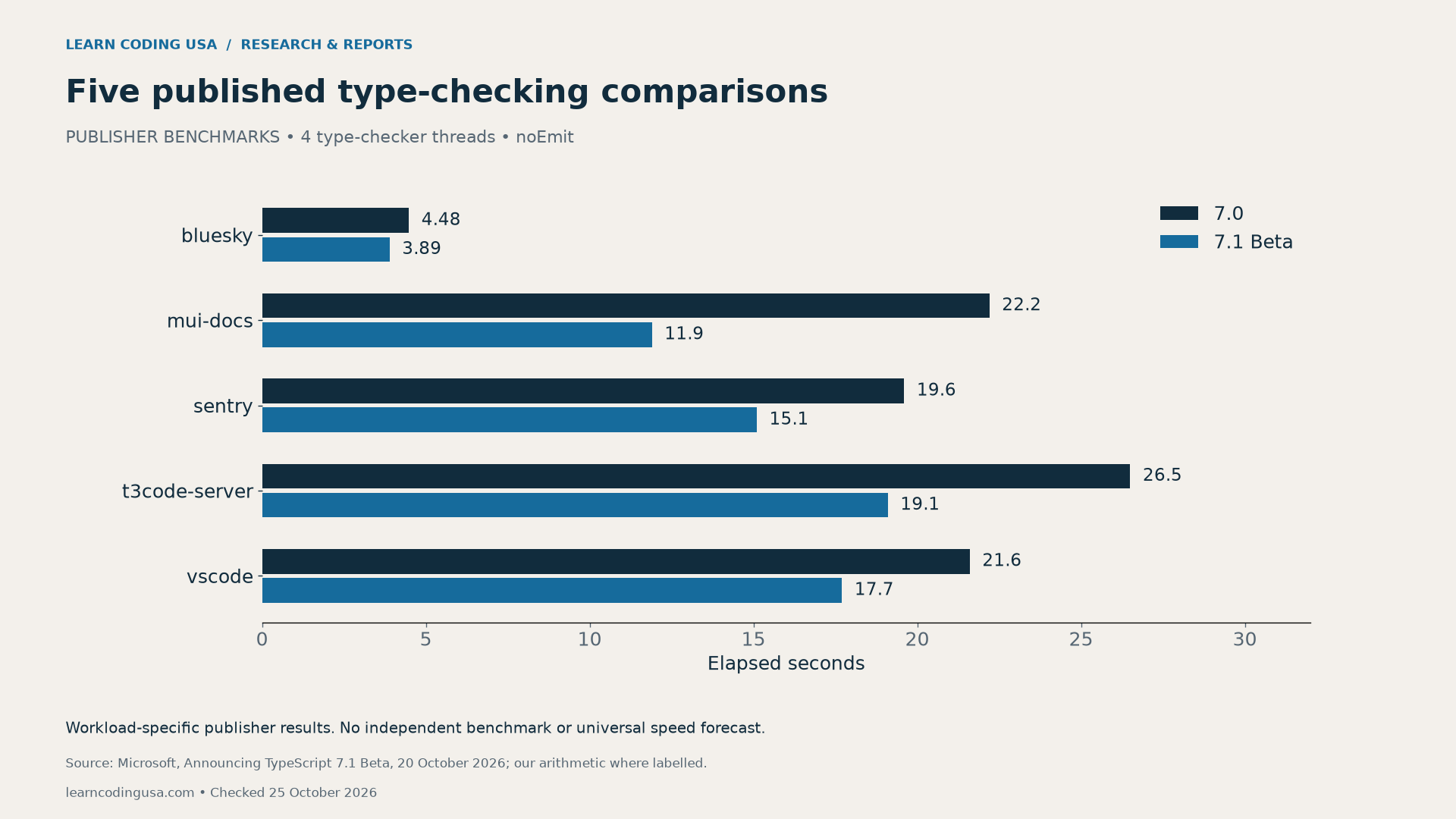
Recalculate percentages and keep the seconds visible
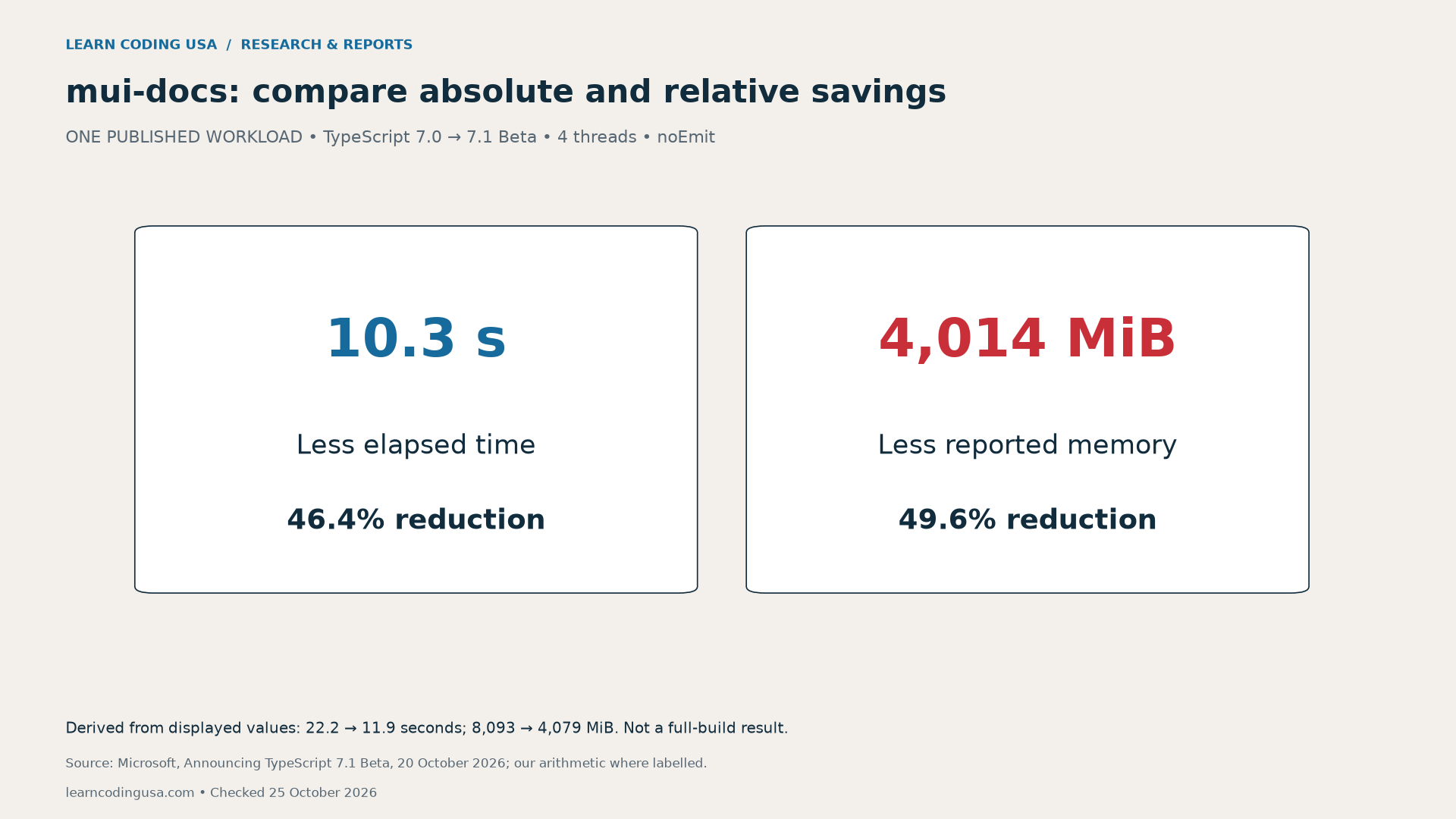
For mui-docs, subtracting 11.9 from 22.2 gives 10.3 seconds. Divide that saving by the original 22.2 seconds to obtain 46.4% less elapsed time, rounded to one decimal. This uses the earlier run as the denominator. It is not a measure of application responsiveness.
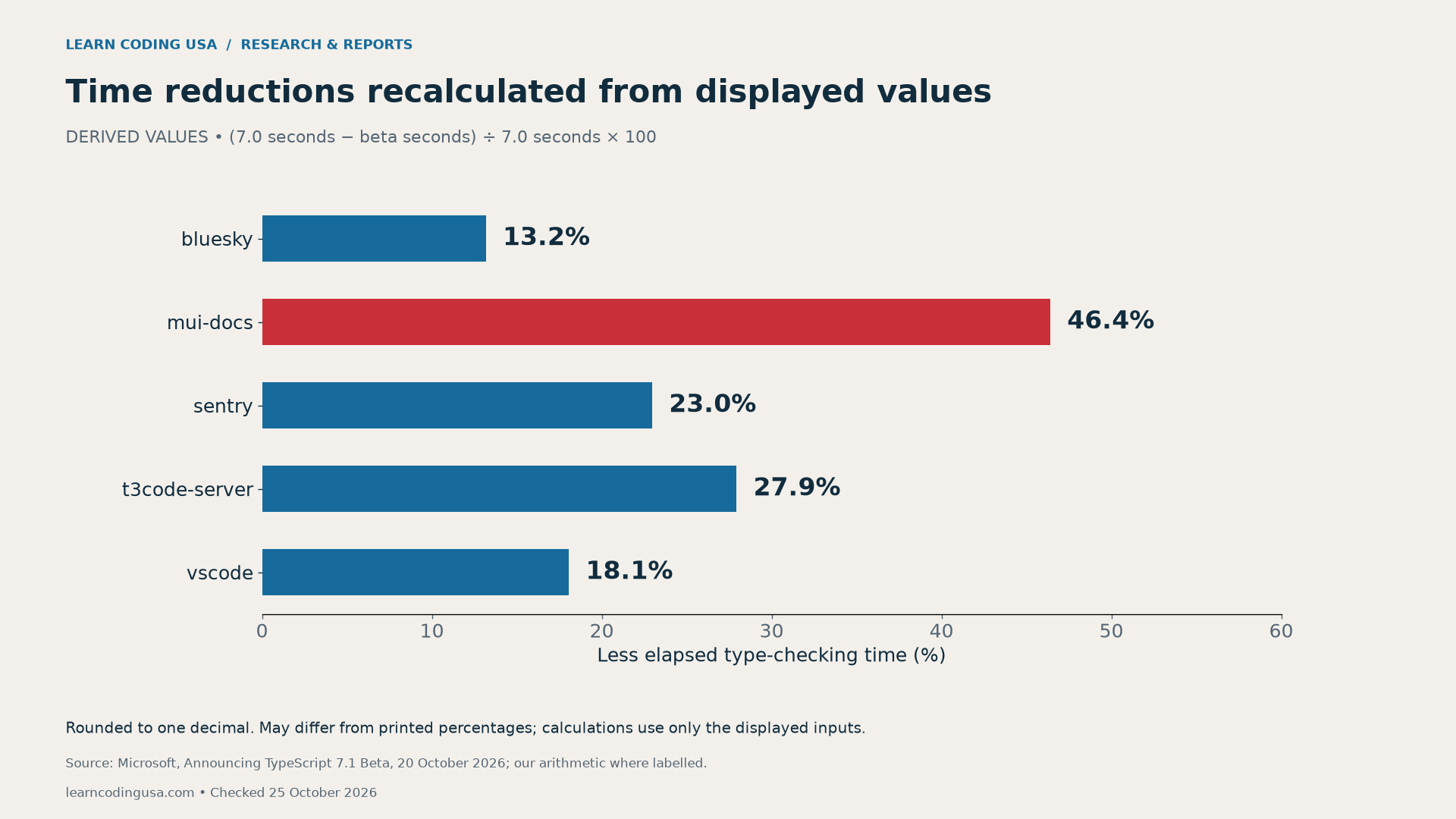
Some recomputed percentages differ from Microsoft’s printed percentages. The displayed timings do not reveal the full underlying precision. Therefore, our CSV keeps the displayed inputs and labels its derived columns. We do not silently present the recomputation as Microsoft’s own percentage or infer additional decimal places.
Absolute and relative savings answer different questions. A percentage compares the result with its baseline; seconds describe the delay removed in that workload. Before planning an upgrade, compare both with the actual bottleneck. Avoid converting a timing reduction into salary gains, cloud savings or a team-wide productivity forecast without the missing evidence.
Memory savings need their own units and conditions
Microsoft also reports memory in MiB. In mui-docs, the displayed values move from 8,093 to 4,079 MiB. That is 4,014 MiB less, or 49.6% of the earlier value. We preserve MiB rather than relabelling the figures as MB or GB.
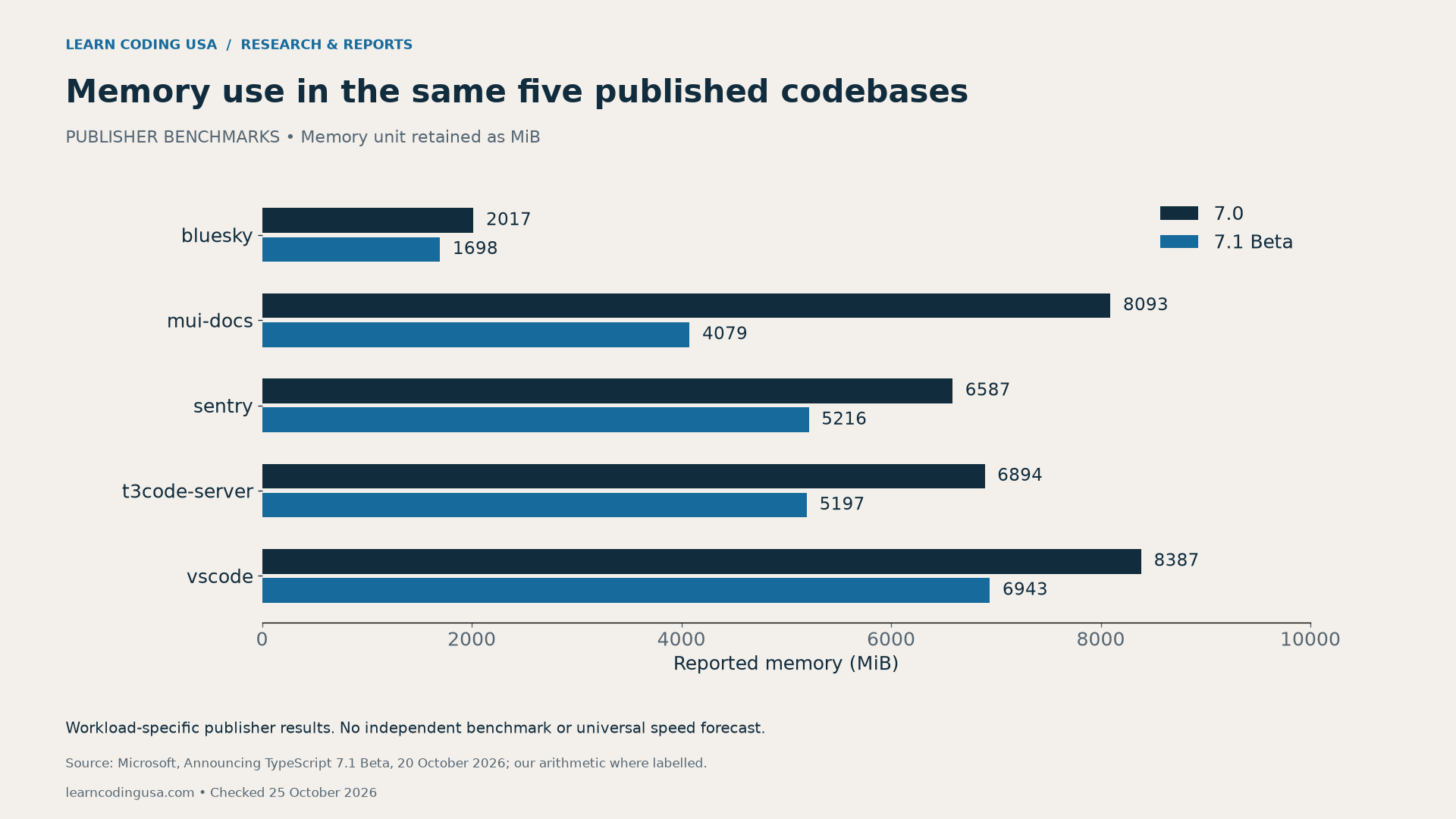
Lower memory use can be worth investigating on a constrained machine. However, a publisher’s memory result cannot tell you whether your project will avoid a failure or fit a particular CI runner. Record the limit, measurement method and outcome in your own environment. Keep an out-of-memory failure in the log if it occurs.
Why noEmit is not a full build or runtime benchmark
The official noEmit reference says the option produces no compiler output such as JavaScript, source maps or declarations. It allows TypeScript to act as a type checker while another tool handles transformation. Therefore, these timings should not be described as end-to-end production builds.
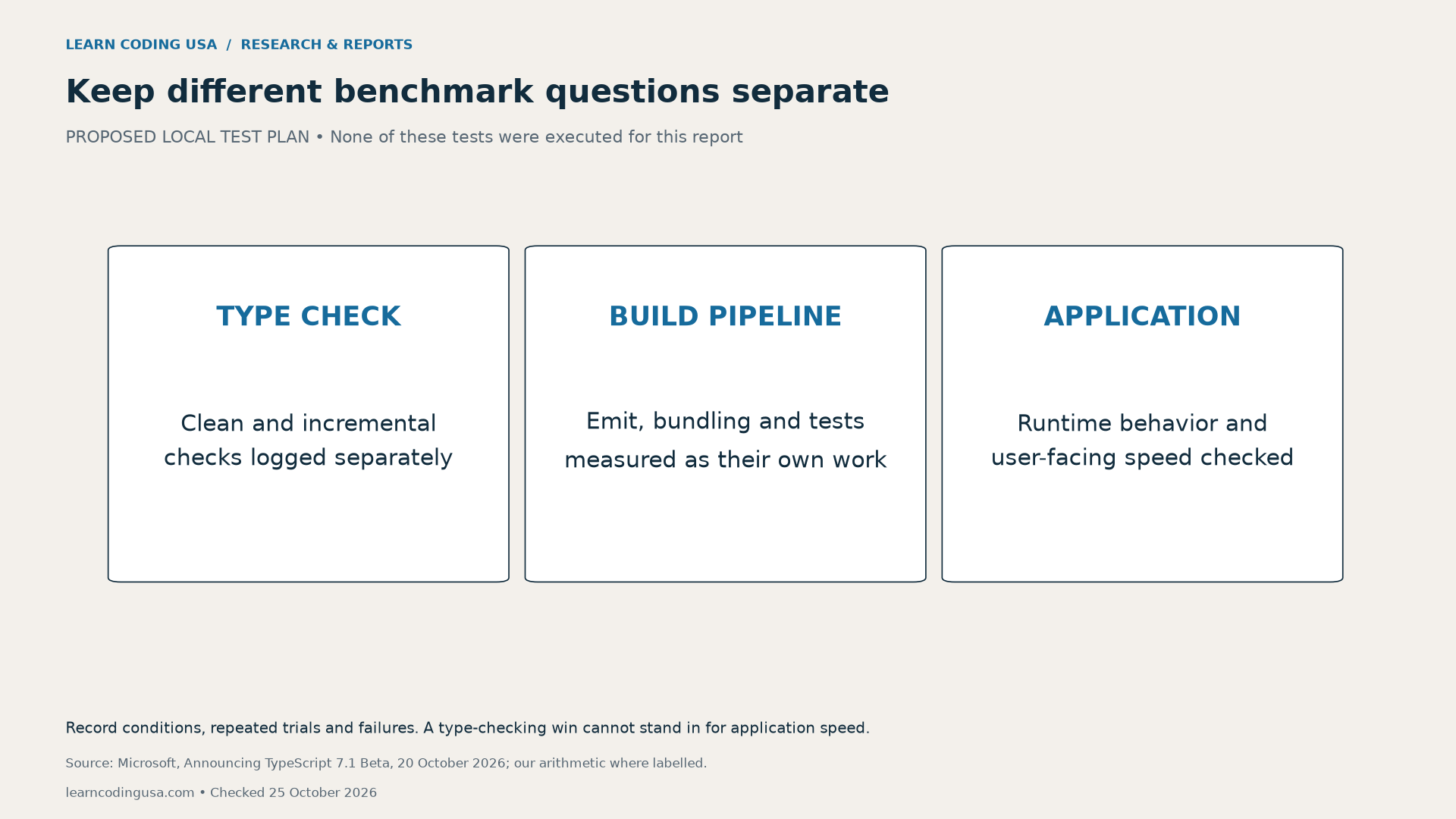
Name the job before timing it. A clean type check, an incremental check after one change, a bundle build and an application request are different workloads. Give each its own baseline and result. If your team cares about a full build, time that separately instead of attaching the type-checking percentage to it.
Plan a fair TypeScript 7.1 beta performance test
First, freeze the repository commit, dependency lockfile and configuration. Record the exact baseline and beta compiler versions. Also note hardware, operating system, runtime and thread settings. Use a trusted project you control and a separate evaluation branch or copy so the working setup remains recoverable.
Microsoft’s older performance investigation guide provides diagnostic background, including configuration and compiler diagnostics. Its older release context is not new October evidence. Use current version documentation to choose supported diagnostics for the compiler you are evaluating.

Next, define cache treatment before the first trial. Keep clean and incremental checks separate. Run repeated trials under the same stated conditions, and retain the individual results. Alternate or otherwise document run order so an unnoticed warm-up pattern does not become a supposed version effect.
The blank benchmark log (CSV) includes elapsed seconds, peak memory, exit status, changed diagnostics and failures. Leave a result blank until measured. Keep the memory-collection method consistent. Do not compare one tool’s peak-process value with another tool’s whole-machine reading as though they were identical.
Tech Consulting Tailored to Your Coding Journey
Get expert guidance in coding with a personalized consultation. Receive unique, actionable insights delivered in 1-3 business days.
Get StartedSummarize comparable successful trials with a median and a stated spread, such as the minimum and maximum. Retain failed trials separately with their reasons; do not erase them to improve the picture. If the outputs or diagnostics changed, investigate that difference before calling the comparison equivalent.
Check compatibility before making an upgrade decision
Performance is one acceptance condition. Also check your editor, build tools, framework integration and relevant tests against the intended version. Read the current release notes for behavioral changes. A faster check that omits expected files or introduces unresolved errors is not an equivalent improvement.
Decide in advance what would justify continuing the evaluation. For example, you might require a repeatable reduction in the job you actually wait for, acceptable memory use and understood diagnostics. Those are proposed decision criteria, not thresholds validated by this report. Keep the stable setup if the evidence is incomplete.
Our older TypeScript role in web development article provides general language context. Use current official documentation for version-specific behavior. The package-manager upgrade report applies the related principle of checking distinct acceptance conditions separately.
Download the data and reproduce the arithmetic
The publisher benchmark values and derived savings (CSV) contain five named codebases, displayed seconds and MiB, absolute differences and explicitly derived percentages. Percentage reduction equals the earlier value minus the later value, divided by the earlier value, multiplied by 100.
We transcribed the official tables and calculated those fields with a retained script. No new measurements, representative averages or statistical confidence intervals were produced. The blank log is a proposed reproducibility aid. Recheck the beta status and current release guidance before starting a later evaluation.
Suggested citation: Learn Coding USA, “TypeScript 7.1 Beta Benchmarks: Is the Upgrade Worth Testing?”, checked October 25, 2026. Cite Microsoft for the published measurements and this report for the transparent recalculation, original charts and blank benchmark log.


