







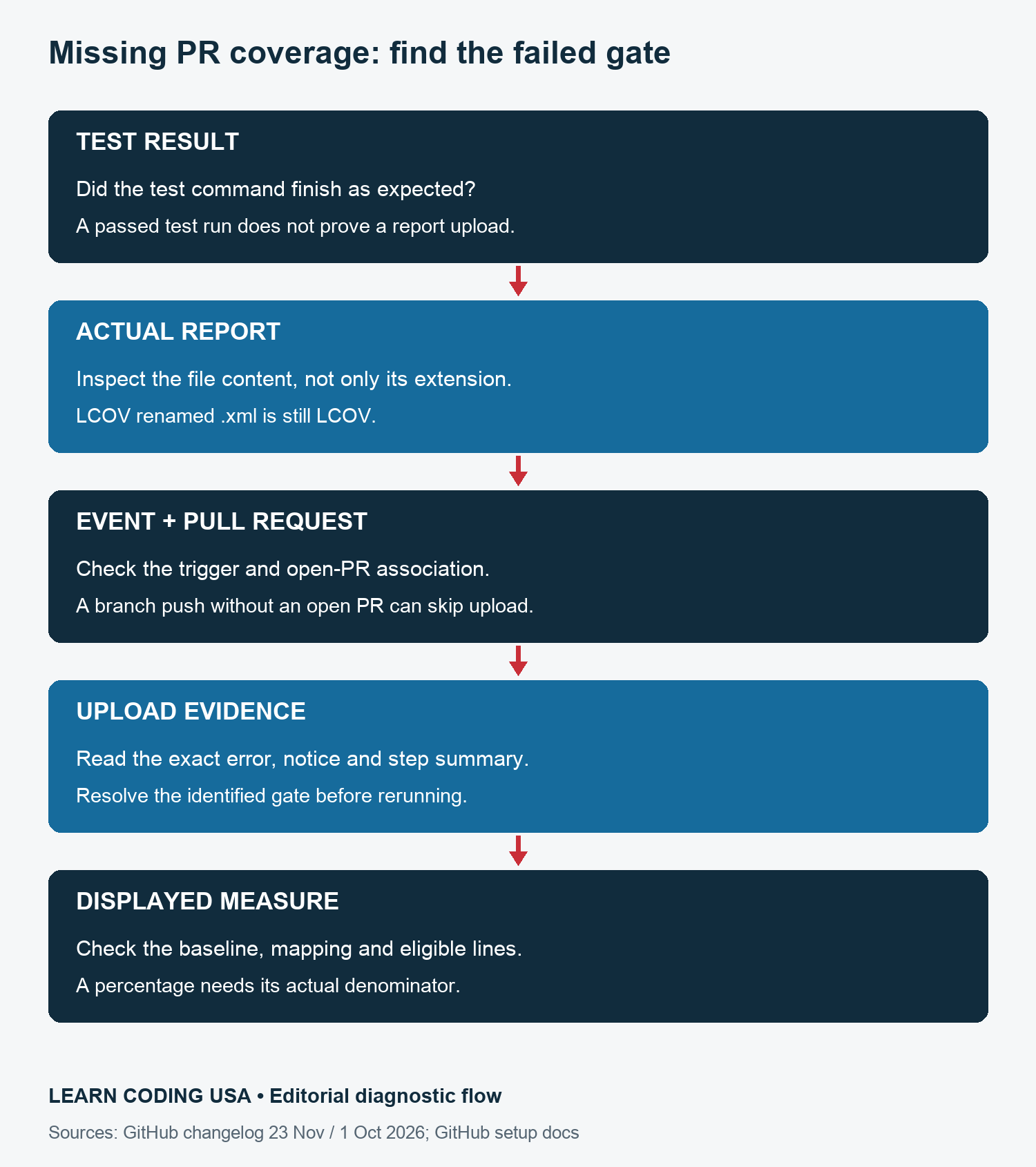
A GitHub Code Quality Cobertura upload can fail even when your tests pass. Start with the report and the upload log before rerunning the entire workflow. A successful test command, a usable coverage file and a visible pull-request result are separate pieces of evidence.
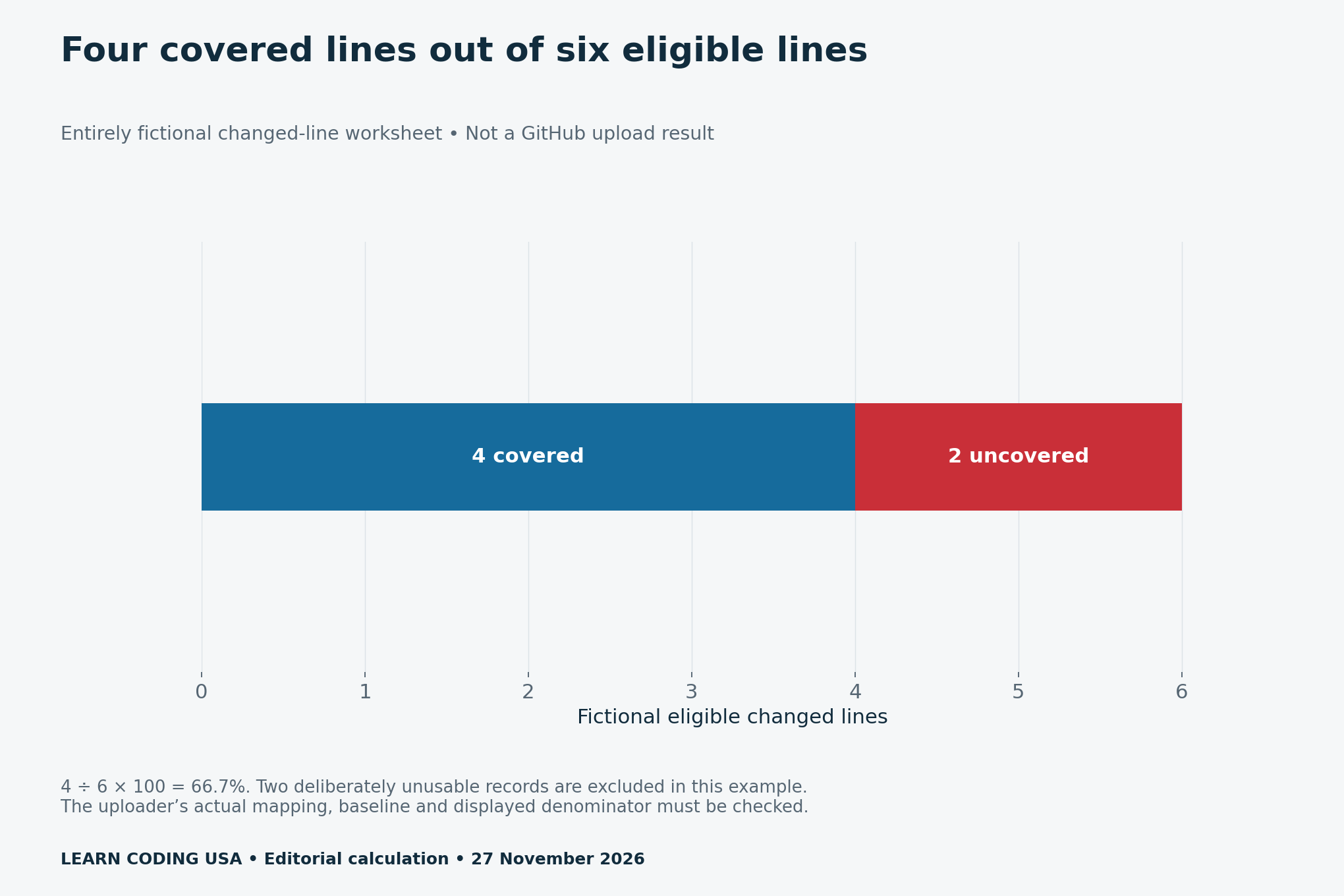
This guide supplies three unrun troubleshooting fixtures, a fictional line-count example and four CSV tools. In our worksheet, four covered lines out of six eligible changed lines equal 66.7%. That arithmetic is not a measured GitHub result or a prediction of the percentage your pull request will display.
GitHub Code Quality Cobertura upload: what changed?
GitHub’s 23 November announcement says this uploader now rejects unsupported report formats with an explicit error. It can also process valid Cobertura reports more leniently, skipping individual records without usable line numbers or hit counts. The change concerns this Code Quality uploader, not every coverage service or every XML-based report.
The same announcement scopes availability to GitHub Team and Enterprise Cloud, including cloud data-residency arrangements, and excludes Enterprise Server. First confirm that Code Quality is enabled for the repository. Do not diagnose a missing feature as a broken test suite before checking the product and repository setup.
Check the file content before the extension
A file named coverage.xml can still contain the wrong format. For example, renaming an LCOV artifact does not convert its content to Cobertura. Inspect the retained artifact from the run you are investigating. Record the producing command, file path and format together so another maintainer can trace the same evidence.
GitHub’s setup documentation requires a real Cobertura report and shows how to generate one for different tools. It also explains the default-branch baseline and pull-request comparison. Use the instructions for your own framework and keep the relevant workflow permissions narrowly scoped; this article does not change any repository settings.
Before changing a workflow, save its current version and the failing run’s log. Then change the report-producing configuration in a disposable branch. A format conversion should preserve the source-file and line information needed for mapping. Compare the artifact itself rather than treating a renamed path as proof that conversion worked.
A skipped branch upload is a different outcome
The 1 October branch-upload change describes a separate case: a push to a non-default branch with no open pull request skips the upload rather than failing it. The notice and step summary explain that situation. Keep it distinct from an unsupported-format error.
If a workflow runs only on push, opening a pull request does not itself cause a new upload. The documented choices include a later push or an appropriate pull-request trigger. Check the actual event and PR association before changing the tests. Do not infer that every skipped step has the same cause.
Compare three unrun fixtures
| Fixture | What varies | Expected diagnostic route |
|---|---|---|
| Renamed LCOV | LCOV content; .xml filename | Check actual format; documented validation failure |
| Branch without PR | Valid report; non-default push; no PR | Check documented upload skip |
| Supported PR candidate | Cobertura; supported event; baseline | Inspect upload, mapping and displayed result |
Keep the test result constant while varying one suspected gate. Otherwise, a changed dependency, report format and trigger in the same run can make the outcome hard to interpret. The fixture matrix records the intended differences. Its execution-status cells explicitly say unrun, so readers can distinguish a plan from an observed result.
Next, run only the comparison that fits your own disposable test repository. Record the installed tool versions, action reference, commit, event and artifact. Capture the first actionable notice or error. Once you have that evidence, decide whether rerunning tests addresses the actual failure or merely repeats a step that already succeeded.
Read the denominator before quoting coverage
Our synthetic worksheet contains eight records: six eligible line records and two deliberately unusable records. Four eligible lines have positive hit counts and two have zero hits. Under the worksheet’s stated rule, the coverage fraction is 4 ÷ 6, or 66.7% after rounding to one decimal place.
| Worksheet component | Records | Treatment in this example |
|---|---|---|
| Covered eligible lines | 4 | Numerator and denominator |
| Uncovered eligible lines | 2 | Denominator only |
| Unusable line number | 1 | Excluded |
| Unusable hit count | 1 | Excluded |
However, do not turn a missing hit count into a zero-hit observation. Those states answer different questions. A zero is an observed value in the fixture; a blank is unusable for its chosen calculation. Likewise, do not copy the worksheet denominator into a real PR without checking which files and changed lines the service actually matched.
Coverage also does not establish that assertions are useful or that every important behaviour was exercised. Use it to locate questions for review, then inspect the relevant tests and requirements. A higher percentage alone cannot show that a user journey works or that a security boundary is correctly enforced.
Use the downloads as an evidence ledger
Start with the unrun-fixture matrix to identify the suspected gate. Then inspect the fictional line records to reproduce the calculation. Finally, use the blank diagnostic ledger to retain evidence from your own run. Its empty cells are intentional; fill them with observations rather than treating the example as a completed audit.
Tech Consulting Tailored to Your Coding Journey
Get expert guidance in coding with a personalized consultation. Receive unique, actionable insights delivered in 1-3 business days.
Get Started- Three unrun upload fixtures (CSV)
- Fictional coverage line records (CSV)
- Blank coverage diagnostic ledger (CSV)
- Primary sources and claim boundaries (CSV)
For related review habits, see our Stylelint autofix review and Cargo warning coverage guide. Each separates a tool’s message from the stronger conclusion a maintainer may want to draw.
Method and limitations
Research checked on 27 November 2026. We read the official GitHub announcements and setup guidance, constructed three editorial fixtures, and checked the synthetic arithmetic locally. We did not run the uploader, query a real repository or benchmark any plan. The fixtures are a reusable investigation design, not empirical success rates.
Suggested citation: Learn Coding USA, “GitHub Coverage Missing? Check the Report Before Rerunning Tests”, 27 November 2026. Keep the unrun-fixture and fictional-calculation qualifications beside any reused figures.


